
Marketing Agency Time Tracking
Time Tracking Software for Marketing Agencies
Track client work, campaign budgets, project expenses, approvals, and reports without slowing down the work your team is there to do.
Built for Agency Workflows
Keep time, expenses, budgets, and client work connected
Agency teams bounce between clients, campaigns, meetings, revisions, freelancers, internal priorities, and reporting deadlines. MindSalt gives teams a practical way to capture that work, review it, and turn it into better budget, billing, staffing, and reporting decisions.
Track time across accounts and campaigns
Employees can enter time by client, campaign, project, task, or activity so creative, strategy, media, and account work stays organized from the start.
Keep retainers and budgets in view
Compare tracked hours and project expenses against budgets so account managers can spot scope creep, extra effort, or rising costs before they become harder to fix.
Answer client questions with clearer records
Use reports to review billable time, non-billable work, expenses, approvals, and project performance without rebuilding everything in spreadsheets.
Agency time tracking that supports the business behind the work
MindSalt helps advertising and marketing teams capture the details behind every campaign without making time tracking feel like the main event. Employees get a straightforward way to enter time and expenses. Managers get clearer project details for budgets, client reporting, approvals, billing, and team planning.
Client and Campaign Time
Work across accounts without losing the details
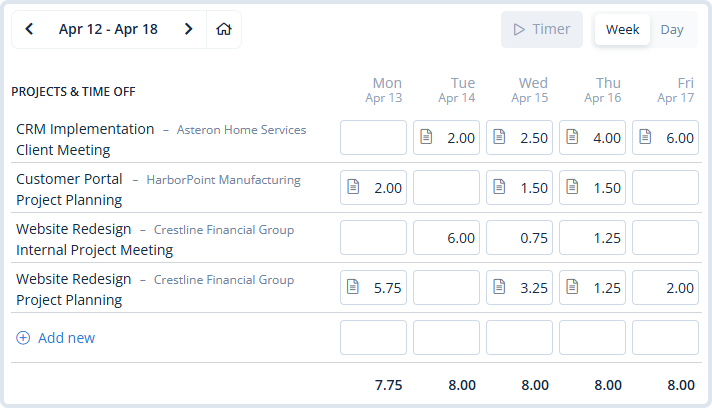
Agency teams move quickly between client calls, creative reviews, copy changes, campaign reporting, ad coordination, production work, and internal planning. MindSalt keeps time organized by client, project, task, and activity so the week does not have to be reconstructed from memory.
- Track billable and non-billable hours for client work and internal agency time.
- Use project and task detail for campaigns, deliverables, services, retainers, and one-off work.
- Let employees enter time from a daily or weekly view, including mobile-friendly access.
Budgets, Retainers, and Margins
Spot scope creep before it becomes a write-off
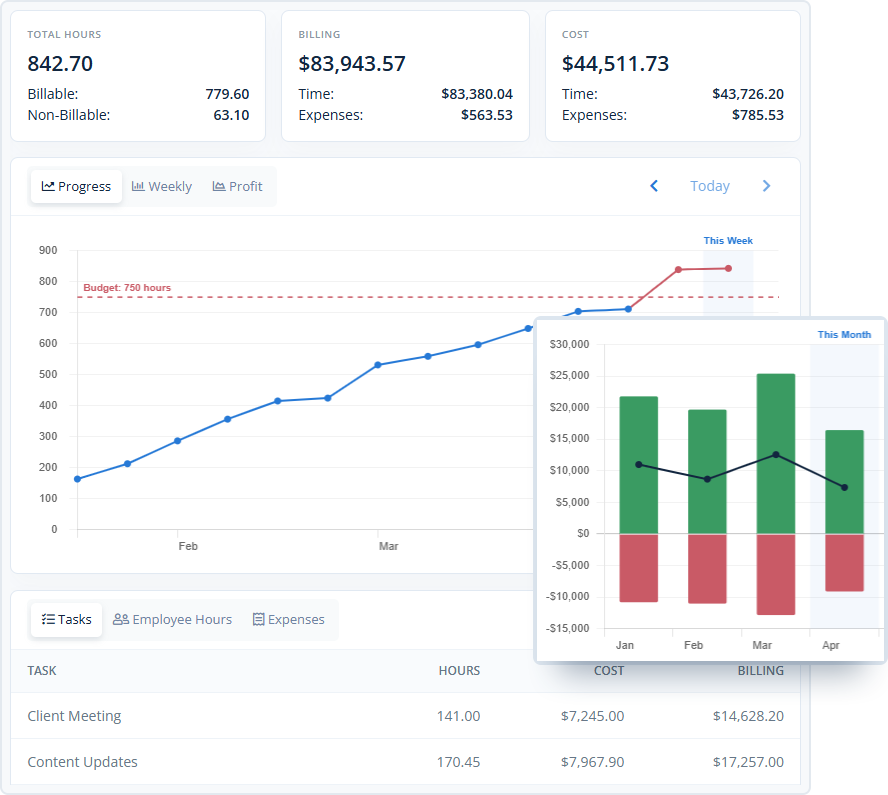
Marketing projects rarely fail all at once. Margin usually gets chipped away by small changes, extra meetings, rushed edits, and out-of-scope work. MindSalt helps managers compare time and expenses against project budgets so budget pressure is visible earlier.
- Track project hours, billing, costs, expenses, and profitability together.
- Compare actual time against planned work for campaigns, retainers, and fixed-fee projects.
- Use reporting to make better decisions about pricing, staffing, scope changes, and client requests.
Learn more about project tracking and budgets.
Expenses and Approval Review
Keep vendor costs, media spend, and receipts with the work
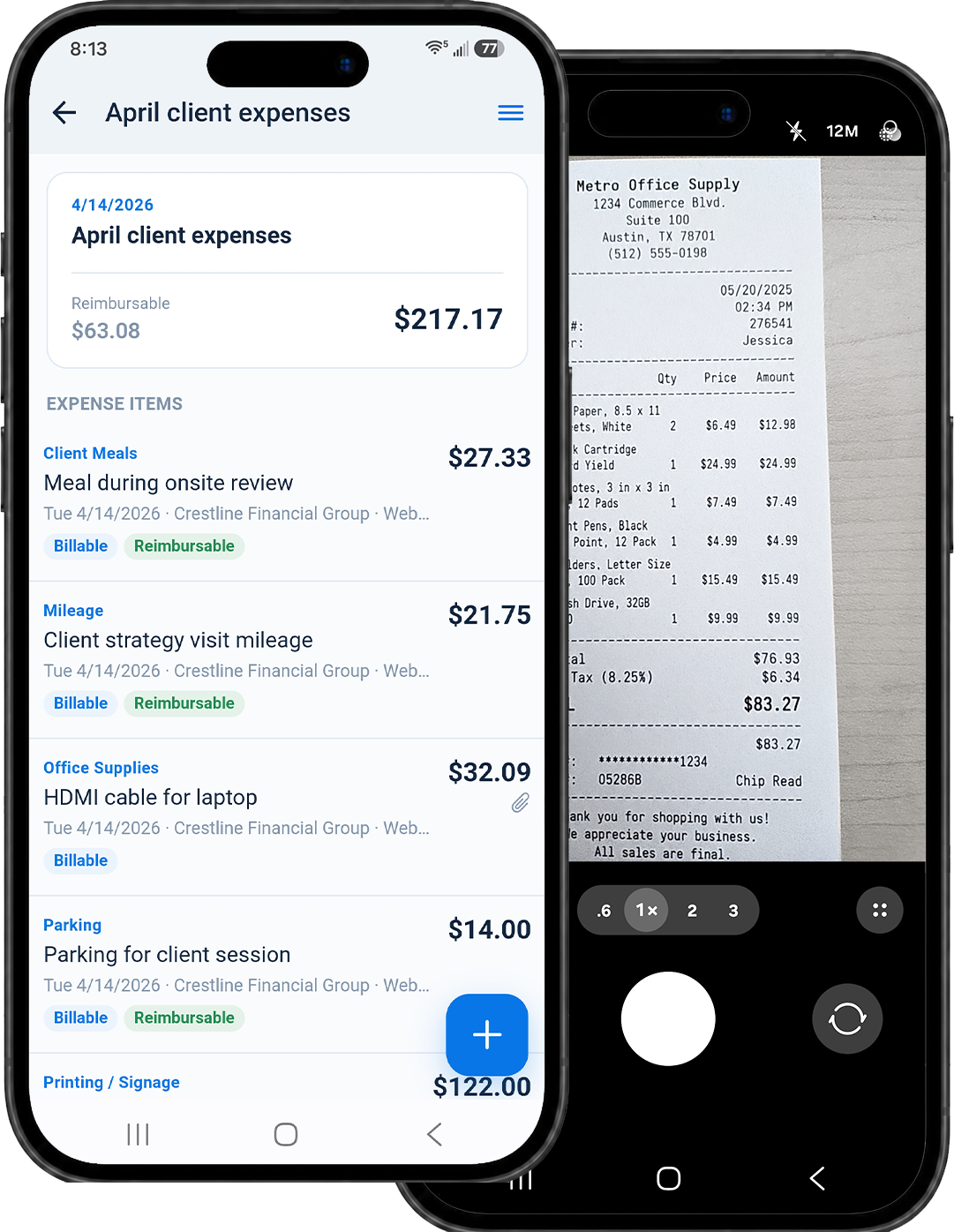
Campaigns often include more than staff time. Freelance help, travel, event costs, print work, production supplies, ad-related fees, and client-billable expenses all need to stay connected to the right project. MindSalt helps teams capture those costs and review them before finance or billing has to clean them up.
- Attach receipts and supporting documents to expense entries.
- Mark expenses as billable, reimbursable, or both.
- Use approvals to review submitted time and expenses before billing or reimbursement.
Learn more about expense tracking and approvals.
Built for Marketing and Advertising Teams
A practical fit for agencies, studios, and campaign-driven teams
Whether your team sells retainers, fixed-fee projects, hourly services, or a mix of all three, MindSalt helps keep time and project costs organized in a way clients, managers, and finance teams can understand.
Advertising agencies
Track strategy, creative, production, media coordination, and account management time by client and campaign.
Digital marketing teams
Keep SEO, paid search, social, email, analytics, and website work connected to the right project and budget.
Creative studios
Separate concept work, design rounds, revisions, internal review, and client-facing production time.
PR and communications teams
Organize media outreach, monitoring, events, crisis response, and client reporting across retainers and projects.
In-house marketing departments
Understand how internal time is being used across campaigns, departments, requests, and recurring work.
Freelancer and contractor-heavy teams
Track project work, vendor expenses, and approval status so outsourced costs do not disappear from the budget.
More Agency Time Tracking Features
Tools for agency time tracking, budgets, expenses, and approvals
Billable and non-billable time
Separate client work from pitches, internal meetings, admin, training, and agency operations.
Campaign and retainer budgets
Compare tracked hours, costs, billing, and expenses against the work you planned.
Organize work by client, campaign, and task
Keep account, creative, media, production, and strategy work connected to the right client, campaign, project, task, or activity.
Time and expense approvals
Review submitted work before it reaches client billing, payroll, or finance.
Billable project expenses
Track media costs, vendor invoices, travel, samples, subscriptions, and production spending.
Reminders and notifications
Remind employees to submit time and let approvers know when items are waiting for review.
Mobile time and receipt capture
Let team members enter hours and capture receipts from the office, home, events, or client visits.
Exports and shareable reports
Export time, expense, budget, and billing details for client reviews, project reporting, or finance review.
Agency Workflow Challenges
How MindSalt helps agencies keep work on track
Marketing and advertising teams are not just looking for a timer. They need a simple way to understand effort, protect budgets, review work, track costs, and answer client questions without turning time tracking into a second job.
| Common challenges | How MindSalt helps |
|---|---|
| Late or incomplete time entries Agency work is hard to recreate at the end of the week when people are jumping between client calls, campaign work, revisions, reporting, and internal tasks. |
Track time by client, campaign, and task Track time by client, campaign, project, task, employee, activity, billable status, and work notes. |
| Retainers are hard to judge from the invoice alone Monthly retainers can hide how much time goes into meetings, strategy, production, revisions, reporting, and client follow-up. |
See how retainer time is being used Review hours by client, campaign, project, task, service area, and employee so account managers can see where the time is going. |
| Budget overruns Campaign hours, vendor costs, media spend, and revisions can push projects past the original estimate. |
Budget tracking Compare planned budgets with actual time, expenses, and project costs. |
| Scope changes Extra revisions, rush requests, and added deliverables can change the real cost of a campaign. |
Spot added work earlier Use project reports to catch extra effort before it turns into write-offs, billing surprises, or awkward client conversations. |
| Billable and internal work Client work, pitches, admin, meetings, training, and business development all affect team capacity. |
Separate billable and internal work Keep billable client work separate from internal activity while still seeing the full picture of team effort. |
| Project expenses Media spend, freelance invoices, travel, supplies, subscriptions, and receipts can end up outside the project record. |
Connected expense tracking Attach billable and reimbursable expenses, receipts, and notes to the right client and project. |
| Approval delays Time and expense reviews can slow billing, reimbursement, and payroll when follow-up is manual. |
Approval workflows Route submitted time and expenses to the right reviewers with notifications and status tracking. |
| Client reporting Agencies need clear details to explain time, costs, progress, and budget usage. |
Reports that answer client questions Report by client, campaign, project, employee, task, date range, budget, billing status, or expense category. |
| Team visibility It is easier to plan work when managers can see which accounts, services, campaigns, and employees are using time. |
See where agency time is going Give managers a clearer view of workload, utilization, project activity, and account effort. |
Related MindSalt Features
More ways to manage agency time, expenses, and approvals
Time Tracking
Simple daily and weekly time entry by client, campaign, project, task, activity, and billable status.
Expense Tracking
Capture vendor costs, receipts, mileage, billable expenses, and reimbursable spending tied to the right project.
Project Tracking
Connect hours, budgets, billing, costs, expenses, and profitability for campaign and client work.
Approvals
Review timesheets and expenses before billing, reimbursement, payroll, or month-end reporting.
Notifications
Remind employees to submit time and notify approvers when reviews are waiting.
Mobile Access
Let employees track hours and capture receipts from any device without installing a separate app.
FAQ
Common questions about agency time tracking
What is marketing agency time tracking software?
Marketing agency time tracking software helps teams record time by client, campaign, project, task, employee, and billable status. MindSalt also connects time with expenses, approvals, budgets, reporting, and billing workflows so agencies can understand where effort and project costs are going.
Why should marketing agencies track billable and non-billable time?
Billable time helps agencies invoice accurately, but non-billable time explains the real cost of internal meetings, pitches, reporting, revisions, and administrative work. Tracking both gives managers better visibility into utilization, pricing, staffing, and profitability.
Can MindSalt track time by client, campaign, project, and task?
Yes. MindSalt can track time by client, project, task, employee, activity, date, comments, and billable status. Agencies can use that structure to organize retainers, campaigns, one-off projects, internal work, and recurring client services.
Can MindSalt help with retainers, fixed-fee projects, and campaign budgets?
Yes. MindSalt helps teams compare tracked time and expenses against project budgets so account managers can see when a retainer or fixed-fee campaign is using more effort than expected. That makes scope conversations easier to have before the work is already over budget.
Can marketing expenses be tracked with the project?
Yes. MindSalt expense tracking can connect receipts, vendor costs, mileage, media-related expenses, travel, supplies, and other project spending to the correct client or project. Expenses can also be marked as billable, reimbursable, or both.
Can managers approve time and expenses before billing?
Yes. Approval workflows let managers, project managers, finance users, or other approvers review submitted time and expenses before they move into billing, payroll, reimbursement, or reporting. Rejected items can be corrected and resubmitted.
Does MindSalt work for remote, hybrid, and mobile agency teams?
Yes. MindSalt works through a modern web browser, so employees can enter time and expenses from a desktop, laptop, tablet, or phone. That helps teams capture work from the office, home, client sites, events, or while traveling.
Get started with MindSalt
Time well tracked is time your agency can trust.
Try all features for 30 days, totally free.
No credit card. No setup fees. No nonsense.