
Reporting and Analytics
Reporting That Helps You Know More and Do More
Reporting software that brings time, expenses, projects, budgets, and profitability together so your team can see what is working, what needs attention, and where the numbers are headed.
Reporting and Insights
Time and expense reporting that keeps the picture in view
Bring time, expenses, budgets, billing, and project activity together in one place. Teams can spot trends, answer questions, and see where projects stand without pulling numbers from five different places.
View time and expenses by client, user, or project.
Run reports by week, month, quarter, or custom date range.
Support payroll, invoicing, and internal reviews with accurate data.
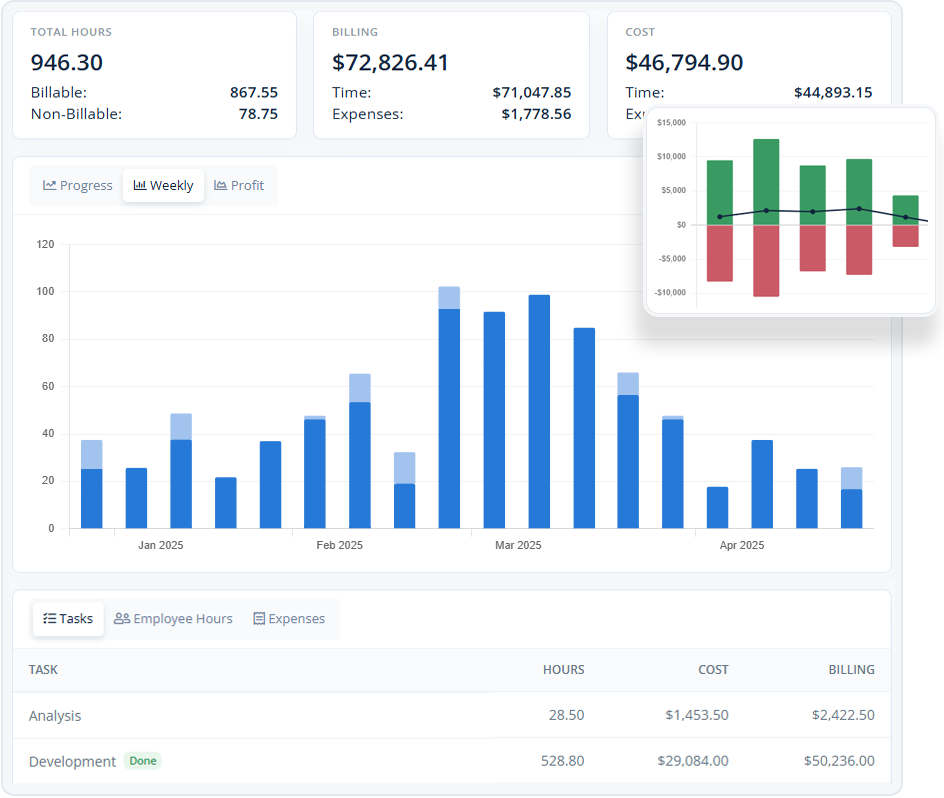
Reports that turn everyday work into useful answers
Every timesheet, expense, budget, and project update tells part of the story. MindSalt reports help bring those pieces together so managers, finance teams, and leadership can make decisions with less guesswork.
Visualize key metrics in real time
Dashboards bring revenue, cost, utilization, and profit into view as time and expenses are tracked. No waiting for someone to rebuild a spreadsheet before you know where things stand.
Track profitability across projects and clients
See how time, expenses, billing, and costs shape profitability across projects, clients, and teams. It helps you spot the work that is healthy and the work that may need a closer look.
Make smarter decisions with actionable data
Use built-in reports to watch trends, catch issues earlier, and make decisions based on what is actually happening across your team’s work.
Compare budgets vs. actuals as work happens
Compare planned budgets with actual hours, expenses, and costs while work is still moving, not after the project is already off track.
Analyze where time is going
Drill into time by task, employee, project, or department to see where work is going, rebalance workloads, and plan future projects with fewer surprises.
Plan and price future projects with confidence
Use past project activity to create better bids, set realistic budgets, and price future work with fewer surprises.
More Reporting Features
Helpful tools for turning time and expense data into answers
100+ built-in reports
Start with ready-made reports for common business needs.
Report exports
Download reports in PDF, Excel, or CSV format.
Manager dashboards
Give managers quick visibility into team and project activity.
Budget vs. actuals
Compare planned hours and costs against real results.
Project profitability
See revenue, cost, and profit across projects and clients.
Custom date ranges
Run reports by week, month, quarter, or custom range.
Saved reports
Save frequently used reports for faster access later.
Flexible filters
Narrow reports by client, project, employee, task, and more.
Related Features
Time Tracking
Expense Tracking
Projects
Approvals
FAQ
Common Reporting Questions
What is time and expense reporting software?
Time and expense reporting software helps teams turn timesheets, expenses, budgets, billing, and project activity into reports they can use for payroll, invoice generation, profitability, and planning. MindSalt keeps billable hours, expenses, and project details together so teams can create invoices and answer questions without chasing spreadsheets.
Can managers see how their projects are performing?
Yes. MindSalt helps managers review project time, expenses, budgets, and profitability so they can see what is on track and what needs attention.
Can finance teams use reports for billing and payroll?
Yes. Reports can support payroll exports, client invoicing, reimbursements, and internal compliance checks with time and expense data in one place.
Can reports show billable and non-billable time?
Yes. MindSalt can report on billable and non-billable hours so teams can better understand utilization, internal work, and client billing.
Can leadership see which clients or projects are most profitable?
Yes. MindSalt can compare revenue, cost, time, expenses, and budgets to help leaders understand profitability across projects and clients.
Can reports help find missing or incomplete timesheets?
Yes. Managers can use reports to review incomplete, unsubmitted, pending, or approved timesheets before payroll or billing deadlines.
Can reports be filtered by client, project, employee, or date range?
Yes. Reports can be narrowed by key details like client, project, employee, task, status, and custom date ranges.
Get started with MindSalt
Discover how better reporting can help you improve projects, profits, and planning.
Try all features for 30 days, totally free.
No credit card. No setup fees. No nonsense.