Consulting Time Tracking
Time Tracking Software for Consultants
Track billable hours, client engagements, utilization, expenses, and project budgets without letting timesheets take over the workday.
Built for Client Engagements
Your expertise is valuable. Track it clearly.
Consulting time affects revenue, project margin, utilization, staffing, and client trust. MindSalt helps consulting firms capture hours and expenses with enough detail to support invoices, budgets, staffing, and project decisions.
Track client work by engagement
Log hours by client, engagement, project phase, task, or activity so consulting work is easier to review and bill.
Understand utilization and margin
See how much time goes to billable delivery, internal work, business development, training, and project management.
Back up invoices with clear detail
Use time notes, expense records, approvals, and reports to give client billing the backup it needs.
Consulting time tracking that connects delivery, billing, and profitability
MindSalt gives consultants a practical way to track client work, monitor project budgets, review time and expenses, and understand how every engagement is performing.
Project-Based Time Tracking
Make every billable consulting hour count
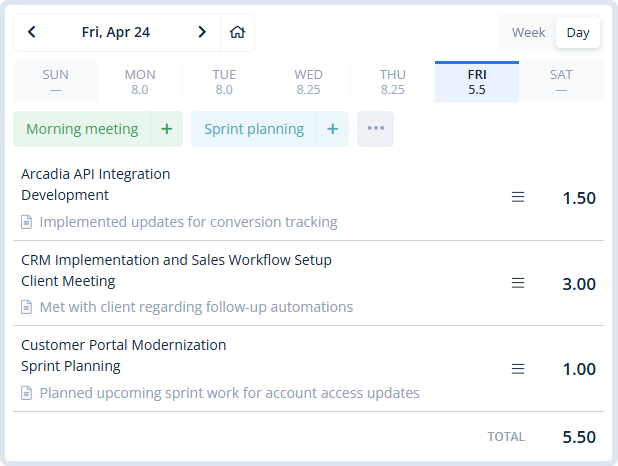
Consultants move between meetings, analysis, implementation, documentation, travel, and follow-up. MindSalt helps track that work under the right client, project, task, and consultant so billing records are easier to review and explain.
- Track client work by engagement, project phase, task, activity, and date.
- Separate billable delivery from internal meetings, training, admin, and business development.
- Use daily, weekly, bi-weekly, semi-monthly, or monthly timesheet periods.
Utilization and Budget Visibility
See where consulting capacity is really going
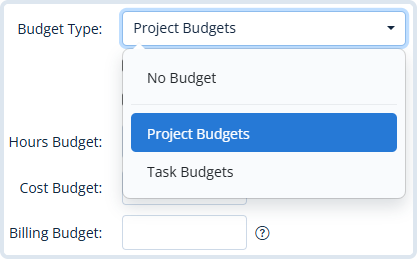
Consulting margins depend on more than total hours. MindSalt helps leaders understand how much time is billable, how much is internal, where budgets stand, and which clients or engagements are consuming more effort than expected.
- Compare billable and non-billable time by client, project, task, or consultant.
- Monitor budget usage, actual hours, billing, costs, and project profitability.
- Use reports to make better decisions about staffing, scope, pricing, and utilization.
Learn more about project tracking and budgets.
Approvals, Expenses, and Billing Review
Route consulting time and expenses through the right approvals
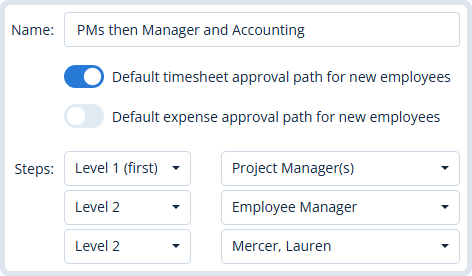
When time and expenses support client invoices, details matter. MindSalt gives managers, project leads, and partners a clearer review step before hours, travel, meals, and reimbursable costs become part of client billing.
- Route timesheets and expenses to the right reviewer before billing.
- Capture receipts and reimbursable costs alongside the project work they support.
- Use approved records and reports to answer client questions with less back-and-forth.
Learn more about timesheet and expense approvals.
Built for Consulting Workflows
Time tracking for different kinds of consulting work
MindSalt fits consulting firms that need more than a simple stopwatch. Use it to keep hours, expenses, approvals, rates, and project budgets organized around the way your firm works with clients. Working independently? See how MindSalt supports freelance time tracking and client billing.
Management and advisory consulting
Track workshops, analysis, meetings, deliverables, and follow-up by client engagement so scope and billing are easier to explain.
Implementation and IT consulting
Connect planning, configuration, migration, training, support, and change requests to the right project phase or task.
Multi-consultant professional services
Give partners, managers, and project leads visibility into utilization, approvals, budgets, and client-ready reporting.
More Consulting Time Tracking Features
Tools for billable hours, utilization, budgets, and client reporting
Time by engagement
Track hours by client, project, phase, task, and consultant.
Track billable and non-billable time
Separate billable client work from internal work, admin, training, and business development.
Budget tracking
Compare tracked hours and costs against engagement budgets before small overruns become bigger problems.
Role and rate detail
Apply different billing rates by consultant, client, project, task, or assignment.
Approval workflows
Let managers, partners, or project leads review time before billing.
Invoice-ready exports
Prepare clean time and expense detail for client billing and finance review.
Consulting expenses
Capture travel, meals, materials, mileage, and reimbursable client costs.
Mobile time entry
Log hours and receipts from client sites, airports, hotels, or home offices.
Consulting Challenges
What consultants need from time tracking software
Consulting firms need more than a timesheet. The right system should protect billable hours, show utilization, support client billing, and keep budgets visible while the engagement is still active.
| Common challenges | How MindSalt helps |
|---|---|
| Billable work gets missed during meetings and follow-up Consultants spend time in workshops, status calls, travel, email, research, and client follow-up, but those hours do not always make it onto the timesheet. |
Keep project details with each time entry Track time by client, project, task, consultant, date, and notes so teams are not trying to rebuild the week from memory later. |
| Retainers and fixed-scope projects are hard to watch in real time By the time an engagement looks over budget, the work may already be done and the margin may already be gone. |
Track hours against budgets as work happens Compare billable and non-billable time against projects and tasks so managers can catch budget or margin issues earlier. |
| Utilization gets reviewed too late Consulting firms need to know whether time is going to client work, internal projects, training, sales support, or admin before the numbers are stale. |
See where consulting time is going Report on billable, non-billable, and internal time to understand utilization, workload, project mix, and capacity across clients and engagements. |
| Billing gets messy when rates vary Partners, senior consultants, analysts, subcontractors, and specialists may all bill differently depending on the client, project, or type of work. |
Keep rates tied to the work Track time by employee, client, project, task, rate, and assignment so billing details match the way the work is actually sold. |
| Managers need review without slowing everyone down Client-facing work often needs a second look before it moves into billing, especially when notes are missing or hours land on the wrong project. |
Review time before it moves forward Route submitted time and expenses to the right reviewer so corrections can happen before reports, invoices, or client questions. |
| Client invoices need clear backup Consulting clients may ask what was done, who worked on it, or why an engagement used more hours than expected. |
Support invoices with better records Use time notes, project details, expenses, approvals, and exports to answer billing questions without digging through emails and spreadsheets. |
| Travel and reimbursable costs can get separated from the work Client-site visits, mileage, meals, lodging, software, materials, and pass-through costs can easily lose their connection to the right engagement. |
Connect expenses to the same projects as time Capture receipts and reimbursable expenses with the related project so costs, billing, and reporting stay connected. |
Related MindSalt Features
Connect consulting time with the rest of your workflow
Time Tracking
Track consulting hours by client, project, task, activity, employee, and date.
Project Tracking
Monitor engagement budgets, actual hours, billing, costs, expenses, and profitability.
Reporting
Build reports for utilization, client billing, budget review, and management visibility.
Approvals
Review submitted time and expenses before they are used for billing or analysis.
Expense Tracking
Capture receipts, reimbursable expenses, travel costs, and client-related purchases.
Mobile Access
Let consultants enter time and expenses from client sites, hotels, airports, or home offices.
Explore time tracking, project tracking, reporting, approvals, expense tracking, and mobile access.
FAQ
Common consulting time tracking questions
What is time tracking software for consultants?
Time tracking software for consultants helps consulting firms record hours by client, engagement, project, task, consultant, billing status, and notes. It gives managers and finance teams cleaner data for utilization, billing, project budgets, expenses, and client reporting.
Can MindSalt track billable and non-billable consulting hours?
Yes. MindSalt can help separate billable client delivery from internal meetings, business development, training, administration, project management, and other non-billable work so you can understand both revenue-producing time and the work that supports it.
How does MindSalt help consulting firms improve utilization visibility?
MindSalt gives consulting firms structured time data that can be reported by client, project, consultant, task, and billing status. That makes it easier to see where capacity is going, which engagements are consuming time, and how much work is billable versus internal.
Can MindSalt support client billing and invoice backup?
Yes. MindSalt connects time entries, notes, expenses, approvals, and reporting so consulting firms can prepare cleaner billing detail for invoices and client questions. It is especially useful when clients expect proof of work, task breakdowns, or engagement-level summaries.
Can consultants track expenses and receipts in MindSalt?
Yes. Consultants can track reimbursable expenses, attach receipts, and connect costs to the same clients and projects as their time. This helps keep travel, meals, mileage, materials, and other client-related expenses from getting separated from the engagement.
Does MindSalt work for consulting teams with multiple roles and rates?
Yes. MindSalt is built for project-based work where employees, clients, projects, tasks, or assignments may need different billing or cost structures. That helps consulting firms handle partners, managers, analysts, subcontractors, and specialists without flattening all work into one generic rate.
Get started with MindSalt
Spend more time consulting and less time chasing hours.
Give your consulting team a clearer way to track time, manage expenses, review work, and protect project profitability.