
Projects
Projects and Budgets, Simplified.
Project tracking software for teams that need to keep projects, tasks, hours, expenses, budgets, and costs together without chasing spreadsheets or disconnected reports.
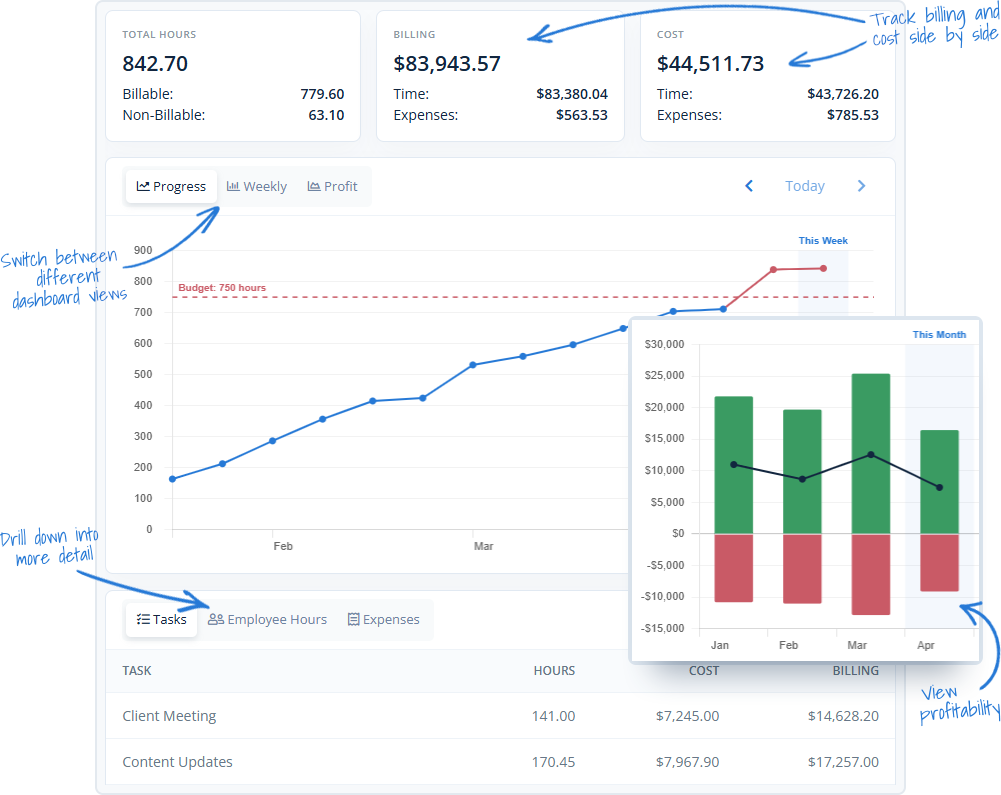
Project tracking software that keeps work and costs connected
MindSalt helps teams see the project story behind the numbers. Track time, expenses, tasks, rates, budgets, and billing together so managers can spot budget drift, review project costs, and understand profitability before the work gets away from them.
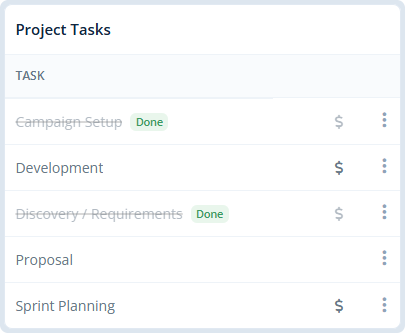
Tasks
Organize each project around the tasks your team actually works on, then track time where it belongs. Tasks can be billable or non-billable, active or closed, and tied into project budgets so the details stay useful after the timesheet is submitted.
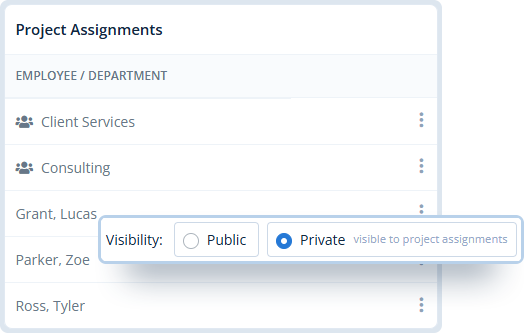
Project Access
Keep the right projects in front of the right people. Make projects open to everyone or limit access to specific employees and teams, then use project-level rates when a client, contract, or special pricing rule needs its own setup.

Set Project Dates
Set project start and end dates so assigned employees can only track time and expenses during the approved project window. It’s a simple way to support contract terms and prevent out-of-scope entries.
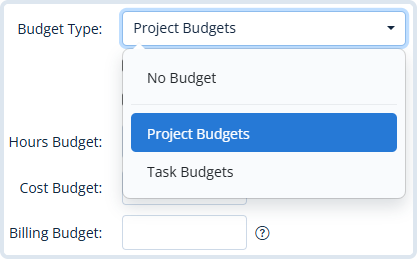
Budget by Project or Task
Set budgets by hours, billing, or cost, then track them at the project level or for individual tasks. Expenses can be included too, giving your team a more complete view of project costs, progress, and profitability.
Built to Bring Projects Into Focus
Why teams choose MindSalt for project tracking
Project work moves fast, and the numbers can get messy just as quickly. MindSalt keeps time, expenses, budgets, billing, and profitability together so managers can see what is happening before the project drifts too far off track.
Real-time project visibility
See where time and expenses are going before projects drift too far off track.
Flexible project budgets
Set budgets by hours, billing, or cost, then track them across the full project or individual tasks.
Time and expenses together
Connect labor, receipts, mileage, and other expenses for a more complete picture of project performance.
Better billing accuracy
Track billable and non-billable work by client, project, and task so billing details are easier to review.
Granular rates
Use different rates by employee, project, task, or assignment to match how your team actually works.
Profitability insights
Compare budgets, costs, billing, and actual work to understand which projects are healthy and which need attention.
More Project Tracking Features
More ways to keep project budgets and work on track
Recurring budgets
Set budgets that repeat on a regular schedule.
Advanced rates
Use different rates by employee, project, or task.
Billable & non-billable time
Track which hours should be billed and which are internal.
Project managers
Let managers view, track, and approve assigned projects.
Custom project fields
Capture extra project details with custom fields.
Adjustable billing amounts
Adjust billable amounts for discounts or corrections.
Require comments
Require notes for selected projects or tasks.
Project status & priority
Organize projects by status, priority, and category.
Related Features
Time Tracking
Expense Tracking
Reporting
Approvals
FAQ
Common Project Management Questions
What is project tracking software?
Project tracking software helps teams connect project work with the details around it, including tasks, time, expenses, budgets, billing, costs, and profitability. MindSalt keeps those pieces together so managers can see where projects stand without digging through spreadsheets or disconnected reports.
Can project managers approve time for their own projects?
Yes. MindSalt can give project managers access to review and approve time for the projects they manage, without giving them access to everything.
How does project budget tracking work?
Project budget tracking compares planned budgets with actual time, expenses, billing, and costs. This helps teams spot budget drift early, understand project performance, and see whether work is staying on track.
Can billing amounts be adjusted without changing the original hours?
Yes. Admins can adjust billable amounts when discounts, write-offs, corrections, or client-specific billing changes are needed.
Can comments be required for certain projects or tasks?
Yes. MindSalt can require employees to enter comments for selected projects or tasks, which helps with billing details, audits, and project review.
Can different tasks have different billing rates?
Yes. Rates can vary by employee, project, task, or project-task assignment, giving teams more flexibility for complex billing rules.
Can teams see which projects are profitable?
Yes. MindSalt compares project time, expenses, billing, costs, and budgets so managers and finance teams can better understand profitability.
Get started with MindSalt
See how easy it is to plan, track, and stay on budget.
Try all features for 30 days, totally free.
No credit card. No setup fees. No nonsense.