
Keep Legal Work Connected to the Matter
Time Tracking Software for Legal Teams
Track billable hours by client, matter, task, and attorney so billing, budgets, approvals, and reports are easier to review.
From Time Entry to Client Billing
Keep legal work connected to the right client and matter
Legal time is most useful when every entry has the right context. MindSalt helps law firms and legal teams track hours by client, matter, task, rate, and approval status so billing, budgets, payroll, and reporting are easier to manage.
Track by client and matter
Attorneys and staff can track hours to the right client, matter, task, activity, or time off category from the start.
Separate billable and non-billable work
Keep client work, internal meetings, admin time, research, training, and write-offs easy to review without losing the full picture of firm activity.
Review time before billing
Use approvals, partner reviews, and reporting to catch missing details before time is used for payroll, client billing, invoicing, or matter analysis.
Keep legal time connected to the right matter
MindSalt helps legal teams capture billable and non-billable work clearly, review it before billing, and use the details for matter budgets, client reports, payroll, and firm visibility. Attorneys and staff get a straightforward way to enter time. Partners and administrators get the context they need to understand where hours are going.
Client and Matter Time Entry
Make legal time easier to capture and review
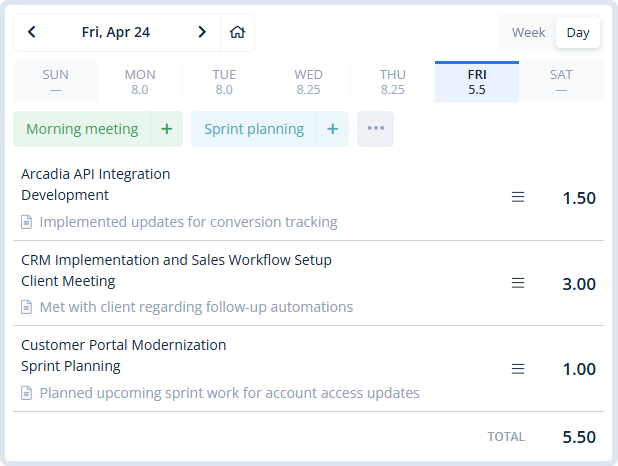
When time entry is too heavy, billable legal work is easier to miss. MindSalt keeps time tracking simple while still capturing the details your firm needs: attorney, date, client, matter, task, hours, notes, rate, and billable status.
- Use daily, weekly, bi-weekly, semi-monthly, or monthly timesheets.
- Track client work, matter activity, internal time, PTO, and administrative work in one place.
- Let attorneys and staff copy recent work, use favorite activities, and enter time from any device.
Matter Budgets and Billing Visibility
Connect legal hours to matters, budgets, and billing
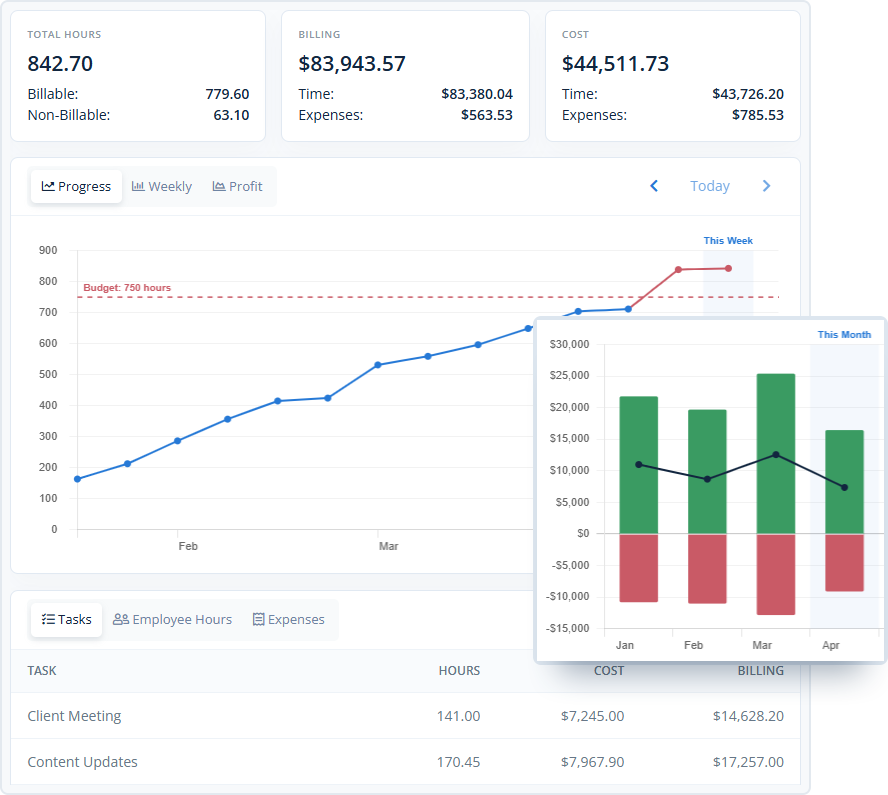
Time tracking should help your firm manage matters, not just prepare invoices. With MindSalt, tracked hours can support matter budgets, billing reports, cost analysis, and profitability reviews so partners and administrators can see how work is progressing while there is still time to adjust.
- Track hours, billing, costs, and expenses together by matter or project.
- Compare planned matter budgets with actual billable and non-billable time.
- Apply different rates by client, matter, task, employee, or assignment so time records match the way your firm bills.
Learn more about project tracking and budgets.
Approvals and Partner Review
Review legal time before it reaches billing
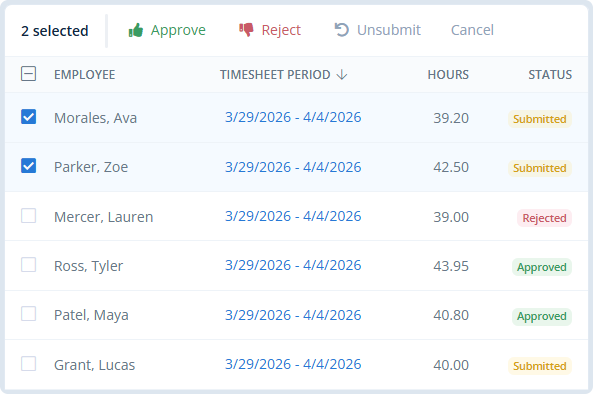
Partners, managers, and administrators can review submitted time before it moves into payroll, billing, or reporting. Reviewers can check submitted time, catch missing notes, reject items that need changes, and maintain a clearer approval history.
- Route timesheets to partners, practice leads, managers, or custom approvers.
- Review submitted hours before they become billing-ready.
- Use reporting to spot unsubmitted, pending, approved, or rejected legal time.
Learn more about timesheet approvals.
Built for Legal Time and Billing
A practical way to manage time across legal work
MindSalt works well for law firms and legal teams that need time tracking to support client billing, matter budgets, payroll, utilization, reimbursements, and reporting. When legal time affects revenue and client trust, the details matter.
Law firms
Track attorney and staff hours by client, matter, task, activity, and billable status so billing details are easier to review.
In-house legal departments
Track internal legal support, contracts, policy work, investigations, and department requests with clearer reporting by team or activity.
Legal services teams
Keep time, expenses, approvals, and reports organized as teams move between matters, clients, court work, research, and administration.
More Legal Time Tracking Features
Tools that help legal teams track, review, approve, and report time
Billable and non-billable work
Separate client matters from admin time, training, internal meetings, and write-offs.
Flexible billing rates
Use different rates by attorney, staff member, client, matter, task, or assignment.
Matter and task budgets
Compare tracked hours, costs, billing, expenses, and budgets in one place.
Approval workflows
Review submitted legal time before payroll, billing, or invoice creation.
Support invoices with clear records
Use approved time, notes, rates, and matter details to answer billing questions and support invoice review.
Billable expenses
Connect filing fees, travel, mileage, research costs, and reimbursable expenses to the right matter.
Mobile access
Let attorneys and staff enter time from the office, court, home, or on the road.
Exports for billing and payroll
Download time and expense reports for billing review, payroll, reimbursement, or firm analysis.
Legal Timekeeping Challenges
Common legal time tracking challenges MindSalt helps solve
Law firms and legal teams need more than a timer. They need accurate time entries, clean review workflows, matter-level visibility, and reports that support billing decisions.
| Common challenges | How MindSalt helps |
|---|---|
| Rebuilding time from memory Calls, emails, research, drafting, court work, and client follow-up are harder to bill accurately when time is entered later. |
Detailed matter time tracking Track hours by client, matter, task, attorney, date, billable status, and work notes. |
| Billable and admin work can blur together Client matters, internal meetings, training, admin time, and write-offs can be hard to separate without clear categories. |
Separate billable and non-billable work Keep billable client work separate from non-billable activity while still seeing the full picture of firm workload. |
| Matter budgets can slip before anyone notices Hours, expenses, and staffing can move beyond the original budget before the trend is easy to see. |
Matter budget reporting Compare tracked time, expenses, costs, and billing detail against matter or project budgets. |
| Partner review can slow billing down Billing can stall when submitted time needs review and approvals depend on manual follow-up. |
Approval workflows Route submitted time to the right reviewer and track pending, approved, and rejected entries. |
| Client invoice questions Clients may ask what was done, why work took longer, or what a billing entry includes. |
Support billing with clearer records Use matter details, notes, rates, expenses, and reports to answer billing questions with less back-and-forth. |
| Matter expenses can get separated from the work Filing fees, travel, mileage, research costs, and other reimbursable items can end up outside the matter record. |
Expense and receipt tracking Attach billable or reimbursable expenses to the right client, matter, or project. |
| Attorney workload is hard to judge without clear time data Staffing is easier to plan when leaders can see where time is going across matters, attorneys, and staff. |
Workload and utilization reports Review activity by attorney, staff member, client, matter, task, billable status, or date range. |
| Time changes need a clear history Billing, payroll, and audits are easier when time changes, approvals, and review steps are organized. |
Approval and reporting history Keep submitted, approved, rejected, and reported time easier to review when questions come up later. |
Related MindSalt Features
More ways to manage legal time, expenses, approvals, and reports
Time Tracking
Simple daily and weekly timesheets for tracking hours by client, matter, task, and activity.
Project Tracking
Connect matter hours, expenses, budgets, costs, billing, and profitability in one place.
Reporting
Review billable hours, non-billable work, matter budgets, utilization, billing, and profitability.
Approvals
Review timesheets and expenses before they move into payroll, billing, or reimbursement workflows.
Expense Tracking
Capture filing fees, travel, mileage, research costs, receipts, and matter-related expenses.
Mobile Access
Let attorneys and staff track time and expenses from desktops, laptops, tablets, and phones.
FAQ
Common Legal Time Tracking Questions
What is legal time tracking software?
Legal time tracking software helps law firms and legal teams record billable and non-billable work by client, matter, task, attorney, rate, and date. MindSalt connects legal time to approvals, budgets, reporting, expenses, and invoice support so billing details are easier to review.
Can MindSalt track billable and non-billable legal work?
Yes. MindSalt can track billable client work, non-billable internal work, admin time, meetings, training, and write-offs so firms can understand utilization, workload, and billing readiness without maintaining separate spreadsheets.
Can different matters, attorneys, or tasks use different billing rates?
Yes. MindSalt supports flexible rate structures, including rates by employee, project, task, or assignment. That can help legal teams manage client-specific rates, matter-specific rules, staff-level rates, and task-based billing needs.
Can legal time be approved before billing?
Yes. Timesheet approval workflows let partners, managers, practice leads, or other approvers review submitted hours before they move into billing, payroll, invoice generation, or reporting.
Does time tracking help with matter budgets?
Yes. Tracked hours can be compared against matter, client, or task budgets so partners and administrators can see whether work is staying on track. MindSalt can also bring expenses, costs, billing, and profitability into the same project view.
Can MindSalt support legal billing and invoices?
Yes. MindSalt can help organize approved time, rates, notes, expenses, and related billing details so legal teams have cleaner support for invoicing and client billing review.
Can reports show legal time by client, matter, attorney, or date range?
Yes. MindSalt reporting can help teams review billable time, non-billable time, matter activity, attorney workload, budgets, billing, and profitability across useful filters and date ranges.
Get started with MindSalt
Track legal time without the billing cleanup.
Try all features for 30 days, totally free.
No credit card. No setup fees. No nonsense.