
Track Every Hour. Keep Every Project Moving.
Construction Time Tracking Software
Track crew hours, job costs, expenses, and approvals so field and office teams stay on the same page.
From Jobsite to Back Office
Keep construction time, costs, and approvals connected
MindSalt helps field crews, supervisors, project managers, and office teams keep hours, expenses, approvals, budgets, and reports connected, so payroll, billing, and job costing are easier to review.
Track job and project time
Log hours to the right job, project, phase, task, or activity so labor costs are easier to review later.
Enter time from the field
Give field teams and supervisors mobile-friendly access to timesheets, comments, expenses, and approvals from any device.
Keep labor costs visible
Review time, costs, budgets, and expenses by project so managers can spot labor and cost issues before they become difficult to fix.
Capture field expenses
Attach receipts for materials, fuel, travel, deliveries, and job purchases to the right project while the details are still fresh.
Review before payroll or billing
Use approval workflows to catch missing details and keep submitted time and expenses moving through the right review path.
Reduce back-office cleanup
Replace scattered paper, spreadsheets, and manual re-entry with organized time, expense, approval, and reporting data.
Construction time tracking built around real project work
MindSalt helps crews and supervisors capture time and expenses while the details are still fresh, then gives project managers and office teams cleaner records for payroll, billing, and job costing. Teams in the field an easy way to submit hours. Managers get better visibility into labor and job costs.
Field-Friendly Time Entry
Track time where the work happens
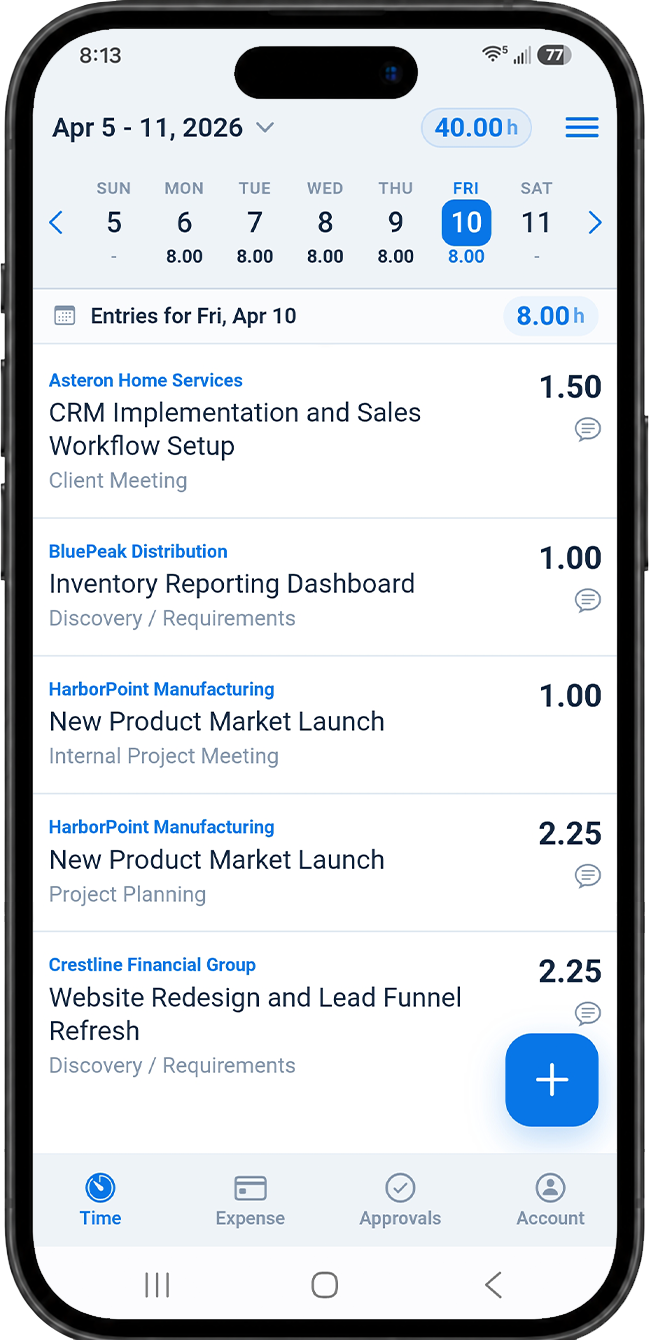
MindSalt gives employees and supervisors a straightforward way to enter time from the field, trailer, office, or anywhere with a browser. Hours can be tied to the right job, project, task, activity, or phase, so teams are not trying to piece everything together at the end of the week.
- Enter time from phones, tablets, laptops, or desktops.
- Track project work, internal time, PTO, and other activities in one place.
- Add notes when the work needs extra context for billing or review.
Learn more about time tracking and mobile access.
Job Costing and Budgets
Know the cost of every hour
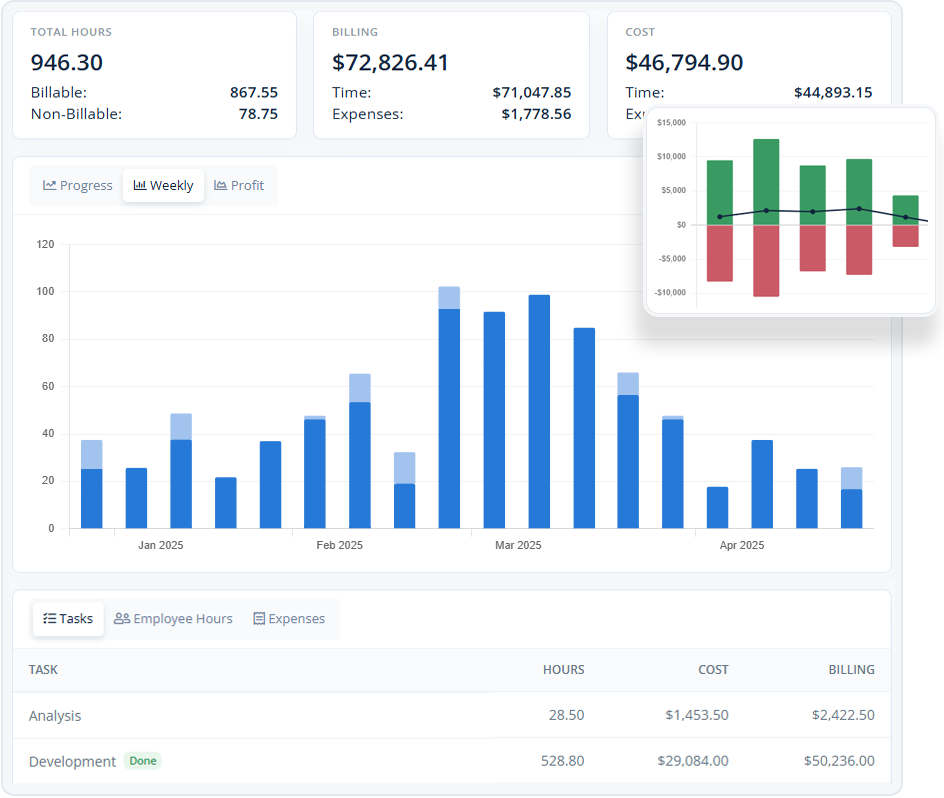
Labor is one of the biggest project costs in construction. MindSalt helps connect every hour to the right project work so managers can review actual labor, project costs, billing, expenses, and budget progress without rebuilding the numbers from spreadsheets.
- Track time, costs, billing, and expenses together by project.
- Compare budgeted work with actual time and field costs.
- Use project, task, employee, or assignment-level rates when billing rules vary.
Learn more about project tracking and budgets.
Field Expenses and Receipts
Keep job costs from getting lost in the field
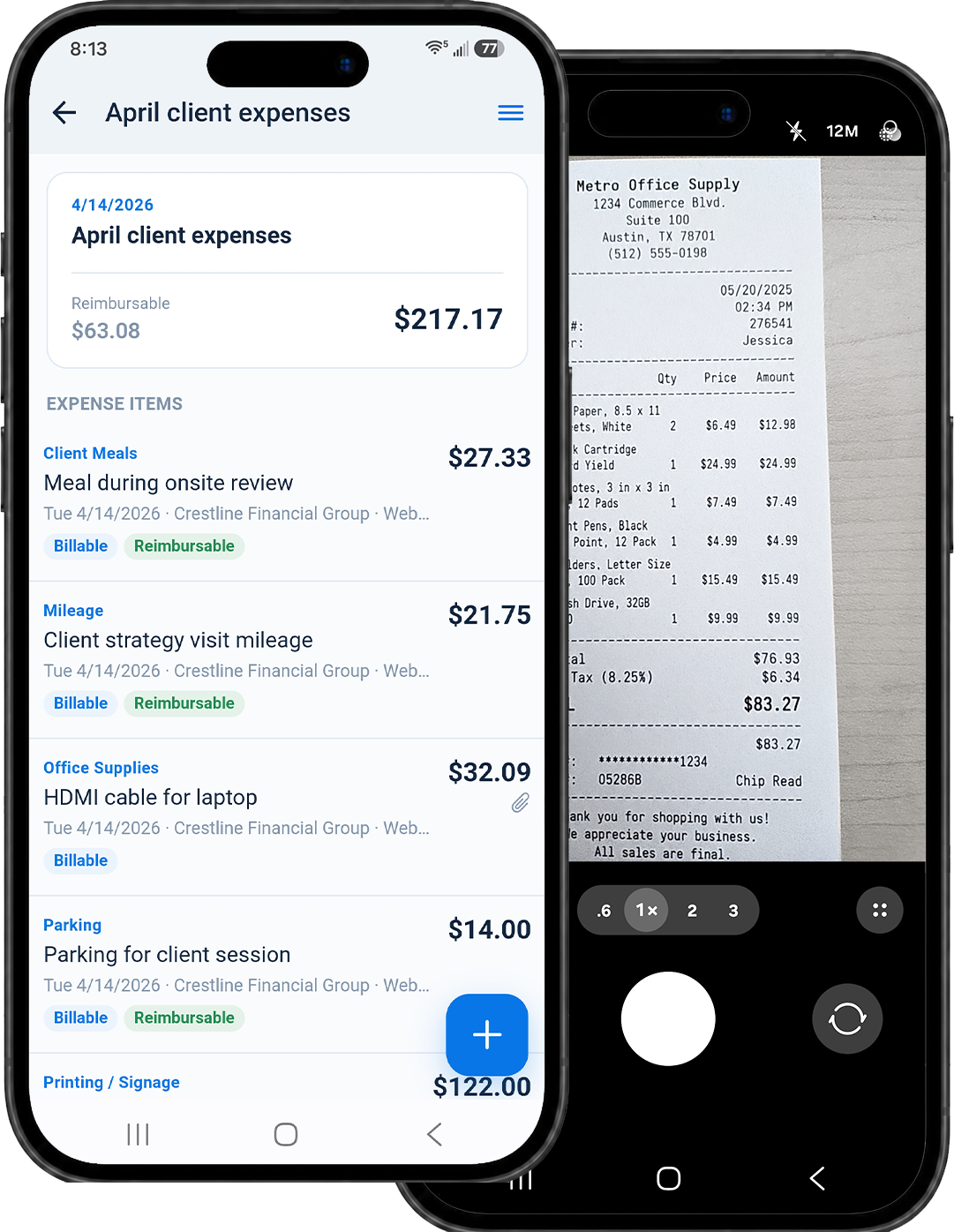
Construction work comes with a lot of receipts. Materials, fuel, deliveries, mileage, travel, and small job purchases can be captured and attached to the correct project while the details are still fresh.
- Capture or upload receipts from a mobile device.
- Mark expenses as billable, reimbursable, or both.
- Keep expenses connected to the same project data as time.
Learn more about expense tracking.
Built for Construction Workflows
A practical way to manage field time and project costs
MindSalt is built for teams that need time tracking to do more than record who simply showed up. When labor, materials, approvals, reimbursements, billing, and job costs all affect project performance, the details need to stay organized.
General contractors
Track labor, expenses, approvals, and budgets across multiple jobs so project managers and finance teams have cleaner records.
Specialty contractors
Connect field time, job phases, service work, materials, travel, and billing details to the right customer and project.
Field service and maintenance teams
Track hours, mileage, expenses, notes, and approvals for jobsite work, service calls, repairs, and recurring maintenance.
More Construction Time Tracking Features
More tools for construction time, costs, and approvals
Job and project tracking
Track time by job, project, task, phase, or activity.
Mobile time entry
Enter and submit hours from phones, tablets, or desktops.
Labor budget visibility
Compare budgeted work with actual time, costs, and expenses.
Approval workflows
Review submitted time and expenses before payroll or billing.
Receipt capture
Attach receipts to materials, mileage, fuel, and field purchases.
Reporting and exports
Download project, payroll, billing, and cost reports when needed.
Notifications
Remind teams to submit time and notify approvers when reviews are waiting.
Clear job records
Keep time, expenses, approvals, notes, and project details tied to the right job.
Construction Time Tracking Challenges
Common construction challenges MindSalt helps solve
Construction time tracking has to work for field teams, supervisors, project managers, and the back office. MindSalt helps connect field time with the office details needed for payroll, billing, job costing, approvals, and reporting.
| Common challenges | How MindSalt helps |
|---|---|
| Late or incomplete field time Crews and supervisors move between jobs, phases, deliveries, weather, and field issues throughout the day. |
Simple field time entry Track hours by employee, job, project, task, phase, date, and work notes. |
| Paper timesheets Handwritten logs can be hard to read, easy to lose, and slow to enter before payroll. |
Digital timesheets Give crews and supervisors a clearer way to enter, review, and submit time. |
| Job costing detail Labor hours need to land on the right job, phase, task, or cost code for accurate job costing. |
Project-based tracking Connect labor hours, rates, costs, and budgets to the right job or phase. |
| Labor budget pressure Small changes in crew time, overtime, or rework can quickly affect the real cost of a job. |
Budget visibility Compare planned budgets with actual labor, expenses, and project costs. |
| Materials and field expenses Receipts for materials, fuel, travel, deliveries, and small purchases can disappear before billing or reimbursement. |
Expense and receipt tracking Attach receipts and billable or reimbursable costs to the right job or project. |
| Approval bottlenecks Time and expense reviews can slow down payroll, billing, and reimbursement when supervisors are busy. |
Approval workflows Route submitted time and expenses to the right reviewers with notifications and status tracking. |
| Change order support Extra work is easier to explain when the related labor, expenses, and notes are easy to find. |
Cleaner project records Use time notes, expenses, and project reports when extra work, billing questions, or change orders need a clear record. |
| Office and field handoff The back office needs reliable field data without chasing paper, texts, or spreadsheets. |
Field-to-office reporting Review and export reports by project, employee, task, date range, expense type, budget, or billing status. |
| Mobile crews Employees and supervisors need a practical way to enter time without returning to a desk. |
Mobile access Use MindSalt from a phone, tablet, or desktop browser with no separate app to install. |
Related MindSalt Features
Connect construction time tracking with the rest of the workflow
Time Tracking
Track construction hours by project, task, activity, employee, and date.
Expense Tracking
Capture receipts, mileage, materials, and project expenses from the field.
Project Tracking
Monitor project hours, costs, budgets, billing, and profitability.
Approvals
Review submitted time and expenses before payroll, reimbursement, or billing.
Notifications
Remind employees to submit time and notify reviewers when approvals are waiting.
Reporting
Use reports and exports to review labor, expenses, budgets, and project results.
FAQ
Common Construction Time Tracking Questions
Why is time tracking important for construction teams?
Time tracking helps construction teams understand labor costs, support job costing, reduce payroll cleanup, and keep project records more accurate. MindSalt helps employees and supervisors record hours by project, task, phase, and date so the back office has cleaner data for payroll, billing, budgets, and reporting.
Is MindSalt construction timesheet software for contractors?
Yes. MindSalt helps contractors, construction teams, field crews, supervisors, and office teams track time by job, project, task, phase, employee, and date. Teams can also capture expenses, route approvals, review payroll details, and report on labor costs and job costs.
Can construction crews track time from the jobsite?
Yes. MindSalt is mobile-friendly, so employees and supervisors can enter time from a phone, tablet, or desktop browser. Time can be connected to the right project and task so field entries still support job costing and reporting.
Can MindSalt track expenses from the field?
Yes. Employees can add expenses from any device, capture or upload receipt images, and connect costs to the right project. This helps keep materials, mileage, fuel, travel, delivery fees, and other project costs from getting lost.
How does MindSalt help with job costing and labor budgets?
MindSalt connects time and expenses to projects so managers can compare actual labor and project costs against budgets. Reports can help teams see where hours are going, which projects are using more effort, and where costs need closer review.
Can supervisors approve time and expenses?
Yes. MindSalt supports approval workflows for submitted time and expenses. Supervisors, project managers, finance users, or other approvers can review entries before they are used for payroll, billing, reimbursement, or reporting.
Get started with MindSalt
Track the Crew. Bill the Job. Keep It Simple.
MindSalt gives construction teams a practical way to track time, capture expenses, review approvals, and keep project records organized without the paperwork.