
Connect Billing, Payroll, and Reporting
Accounting and Finance Time Tracking Software
Track client work, billable hours, payroll time, PTO, approvals, expenses, and billing details in one organized system for accounting and finance teams.
From Time Entry to Billing
Keep client work, payroll, billing, and reporting connected
Accounting and finance teams need time data they can trust for client billing, payroll, PTO, reporting, and internal review. MindSalt keeps hours organized by client, engagement, project, task, activity, and billable status so teams can work from cleaner records without relying on spreadsheets.
Track client and engagement work
Log hours by client, engagement, project, service, task, or activity so billable work stays connected to the right record.
Separate billable and internal time
Keep client service work, admin time, meetings, training, practice management, and internal finance tasks easy to review.
Review before billing or payroll
Use approvals, notifications, and reports to review time before it moves into payroll, client billing, reimbursement, or financial reporting.
Time tracking software that supports accounting and finance workflows
MindSalt helps accounting and finance teams capture client work clearly, review it before billing or payroll, and use the details for budgets, reporting, PTO, reimbursement, and planning. Employees can enter time easily, while managers and finance leaders get the detail they need for billing, payroll, and reporting.
Client, Project, and Engagement Time
Know exactly where the hours go
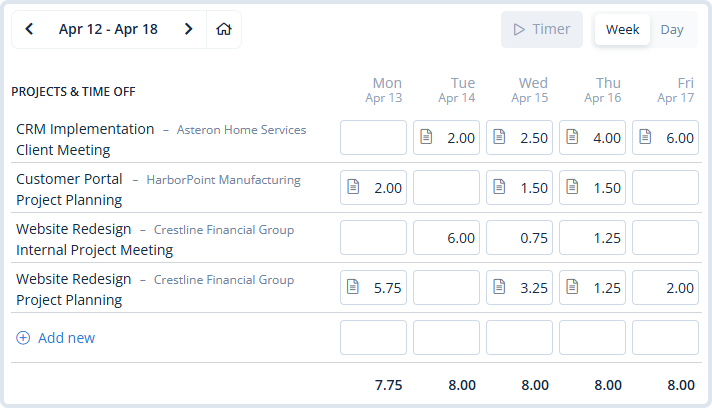
Accounting and finance work often moves across clients, services, deadlines, and internal tasks. MindSalt keeps time entry simple while still capturing the details your firm needs: employee, date, client, project, task, activity, hours, comments, and billable status.
- Use timers or manual entry, depending on how your team works.
- Track client work, internal finance tasks, meetings, payroll work, and PTO in one place.
- Let employees copy recent work, use favorite activities, and enter time from any device.
Billing, Payroll, and Project Cost Visibility
Connect time tracking to billing, payroll, and cost visibility
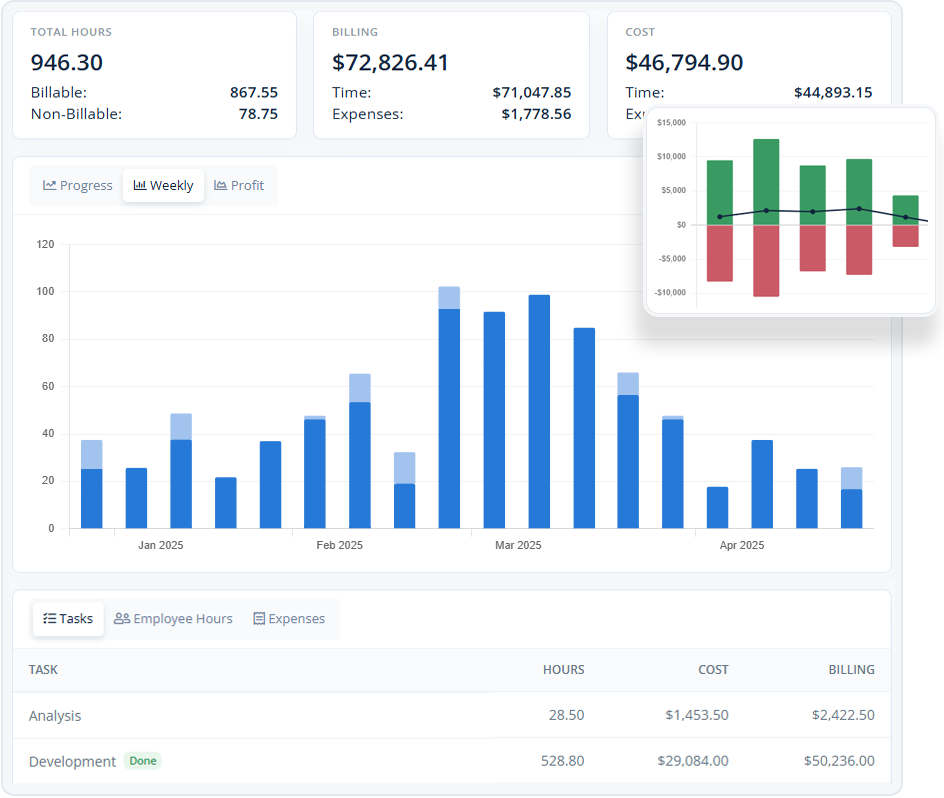
Accounting and finance teams use time data for more than just billing. MindSalt helps managers compare actual hours with budgets, payroll needs, PTO, expenses, and internal work so decisions are based on clearer information.
- Track hours, billing, cost, PTO, and expenses together by client or project.
- Compare client budgets or estimates with actual time and expenses.
- Apply different rates by client, project, task, employee, or assignment so recorded hours match the way you bill.
Learn more about project tracking and budgets.
Approvals and Financial Review
Review time before it reaches payroll, billing, or reports
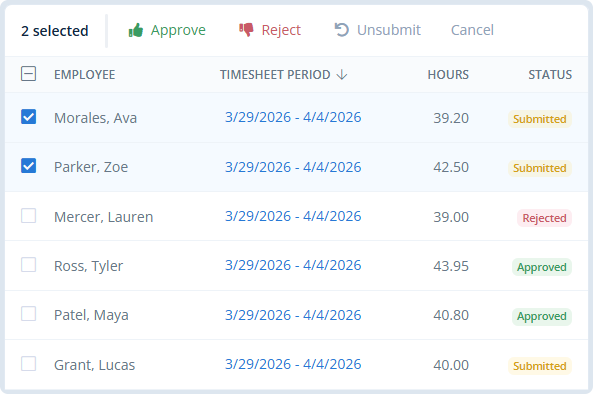
Approval workflows give managers and finance teams a cleaner checkpoint before time is used for payroll, billing, reimbursement, or client reporting. Approvers can review submitted timesheets, catch missing details, reject items that need changes, and keep a clear review trail.
- Route time to managers, partners, finance, payroll, clients, or custom approvers.
- Review submitted time and expenses before they move to billing, payroll, or reimbursement.
- Use reporting to spot unsubmitted, pending, approved, or rejected time.
Learn more about timesheet approvals.
Built for Accounting and Finance Workflows
A better way to manage client time, payroll, and billing
MindSalt works especially well for teams that need time tracking to support billing, payroll, PTO, reimbursement, audits, budgets, and financial reporting. When time affects client revenue, labor cost, compliance, or profitability, the details matter.
Accounting and CPA firms
Track hours by client, engagement, bookkeeping work, tax project, advisory service, staff member, or partner so billing and workload reports have better detail.
Finance departments
Connect payroll preparation, reporting, budgeting, internal finance projects, audits, and operational finance work to the right departments or projects.
Tax and advisory teams
Track tax preparation, advisory work, client meetings, cleanup projects, and internal admin separately for clearer billing and planning.
More Accounting and Finance Time Tracking Features
Tools for tracking time, reviewing work, and creating reports
Timer and manual entry
Start a timer while you are working or enter hours manually when it is easier to catch up later.
Client and project tracking
Track time by client, engagement, project, task, activity, or service.
Billable and internal time
Separate client service work from admin, training, meetings, and internal finance tasks.
Approval workflows
Review submitted time and expenses before payroll, billing, reimbursement, or reporting.
Client budget tracking
Compare client budgets or estimates with actual hours, billing, costs, and expenses.
Track PTO and time off
Track PTO requests, balances, and accruals alongside regular timesheets.
Mobile access
Employees can enter time from the office, at home, or on the road.
Exports and reports
Download reports and exports for payroll, billing, reimbursement, finance review, or deeper analysis.
Accounting and Finance Time Tracking Challenges
Common accounting and finance time tracking challenges MindSalt helps solve
Accounting and finance teams need more than a simple timer. They need a practical way to capture client work, separate billable and internal time, review hours, manage PTO, and use the data for billing, payroll, reimbursement, and reporting.
| Common challenges | How MindSalt helps |
|---|---|
| Hours get spread across many types of work Accounting and finance work can move between tax, audit, bookkeeping, advisory, payroll, client service, and internal projects. |
Track time by client, project, and task Organize hours by client, engagement, project, service, task, employee, date, and billable status. |
| Billable and internal time can run together Client work, admin time, meetings, training, payroll work, and internal finance tasks are easy to mix together without clear categories. |
Separate billable and non-billable work Keep client billable hours separate from internal work while still seeing the full picture of where team time goes. |
| Billing rules are not always the same Different clients, services, staff roles, and engagements may need different rates, notes, approvals, or billing detail. |
Match time records to how you bill Use client, project, task, employee, rate, and assignment details so time records reflect the way the work is actually billed. |
| Payroll depends on complete timesheets Payroll can slow down when time is late, incomplete, missing approvals, or stuck in a manual review process. |
Prepare cleaner payroll reports Use approved time, PTO, and expense records to give payroll a clearer starting point. |
| PTO needs to be visible before payroll closes Vacation, sick time, holidays, and other paid time off can affect payroll, staffing, and team availability. |
Keep PTO connected to submitted time Track time off, accruals, and submitted hours together so managers and payroll have a clearer view. |
| Billing takes longer when details are missing Invoices can get delayed when hours, notes, rates, expenses, and approvals have to be cleaned up after the work is done. |
Keep billing details ready for review Keep approved hours, notes, billable status, rates, expenses, and reports organized before billing begins. |
| Approvals can get stuck with the wrong person Time and expenses may need review by managers, partners, finance, payroll, or client leads before they can move forward. |
Route work to the right reviewer Send submitted time and expenses through the right approval path with status tracking and notifications. |
| Reports need to answer more than one question Finance teams may need records for billing, payroll, reimbursement, audits, staffing, budgets, and planning. |
Report on the details that matter Review time and expenses by client, project, employee, task, billable status, approval status, category, or date range. |
Related MindSalt Features
More ways to connect client work, payroll, billing, and reporting
Time Tracking
Track client, project, task, activity, PTO, and billable time from a simple daily or weekly view.
Project Tracking
Compare client budgets, actual hours, costs, expenses, billing, and profitability in one connected view.
Reporting
Review accounting, finance, payroll, tax, advisory, and internal time by client, project, employee, task, budget, and date range.
Expense Tracking
Capture receipts and project costs for travel, client purchases, mileage, subscriptions, and other billable or reimbursable expenses.
Approvals
Send submitted time and expenses to managers, partners, finance, payroll, or other reviewers before billing or payroll.
Submit time from anywhere
Employees can enter time from a desktop, laptop, tablet, or phone, with reminders to help keep timesheets on schedule.
FAQ
Common Accounting and Finance Time Tracking Questions
How does time tracking benefit accounting and finance teams?
Time tracking helps accounting and finance teams understand where hours are going across clients, services, payroll, internal work, tax projects, advisory work, and finance operations. MindSalt connects that data to billing, payroll, PTO, reimbursement, approvals, and reporting so managers can plan with better information.
Can MindSalt track time by client, project, or service?
Yes. Employees can track time by client, engagement, project, task, activity, and comments. Accounting firms and finance departments can use those fields to keep client work, internal work, payroll tasks, and reporting activity organized.
Can MindSalt separate billable and internal work?
Yes. Teams can separate billable client work from internal finance tasks, admin work, training, meetings, practice management, and other non-billable activity. This helps managers understand utilization, workload, and the true cost of supporting clients and operations.
How can MindSalt help with payroll and PTO?
MindSalt keeps submitted and approved time organized for payroll reporting, while PTO and accrual tracking help teams monitor vacation, sick time, and other time off balances. That gives payroll and finance teams cleaner data before the period closes.
Can managers review time before billing or payroll?
Yes. MindSalt can route submitted timesheets and expenses to the right reviewers before time is used for billing, payroll, reimbursement, or reporting. Approval workflows help keep records cleaner and make it easier to see what is pending, approved, or rejected.
Is MindSalt time tracking software for accounting firms and CPA firms?
Yes. MindSalt helps accounting firms, CPA firms, tax teams, bookkeeping teams, and advisory practices track billable hours, internal time, client work, approvals, expenses, PTO, and reporting in one system. Teams can organize time by client, engagement, project, task, activity, employee, and billable status.
Get started with MindSalt
Track client work. Simplify payroll. Bill with confidence.
Try all features for 30 days, totally free.
No credit card. No setup fees. No nonsense.