
Your Work Is Technical. Your Time Tracking Shouldn’t Be.
Time Tracking Software for Software and IT Teams
Track time by project, task, client, ticket, or activity without slowing down development, support, or implementation work.
From Task to Report
Keep technical work connected to time, budget, and billing
Software and IT teams move quickly across development work, support requests, implementation tasks, maintenance, and client projects. MindSalt keeps those hours organized by client, project, task, activity, and billable status so managers can understand the work without making daily entry harder for technical teams.
Track project and task work
Log time by client, project, task, ticket, activity, or sprint work so the hours are easier to review later.
Separate billable and internal work
Keep client projects, support, admin, maintenance, research, training, and internal development easy to review without losing the full picture.
Review before billing or payroll
Use approvals, notifications, and reports to review technical hours before they move into payroll, client billing, budgets, or project analysis.
Time tracking software that fits technical work
MindSalt helps software and IT teams capture project work clearly, review it before billing or payroll, and use the details for budgets, reporting, forecasting, and client communication. Developers, IT staff, and support teams get an easier way to enter time, while managers get the details they need for budgets, billing, reporting, and planning.
Project and Task Time
Track time without slowing down developers or IT staff
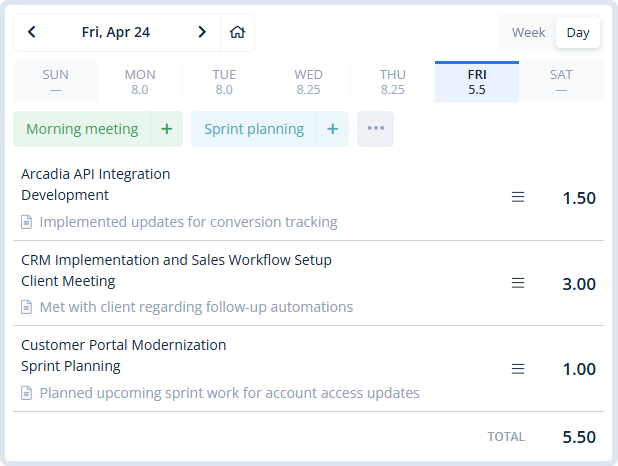
Technical work changes quickly. MindSalt keeps time entry simple while still capturing the details your business needs: employee, date, client, project, task, activity, hours, comments, and billable status.
- Use timers or manual entry, depending on how your team works.
- Track development, support, implementation, maintenance, and internal work in one place.
- Let employees copy recent work, use favorite activities, and enter time from any device.
Budgets and Delivery Insight
Connect technical effort to budgets, cost, and profitability
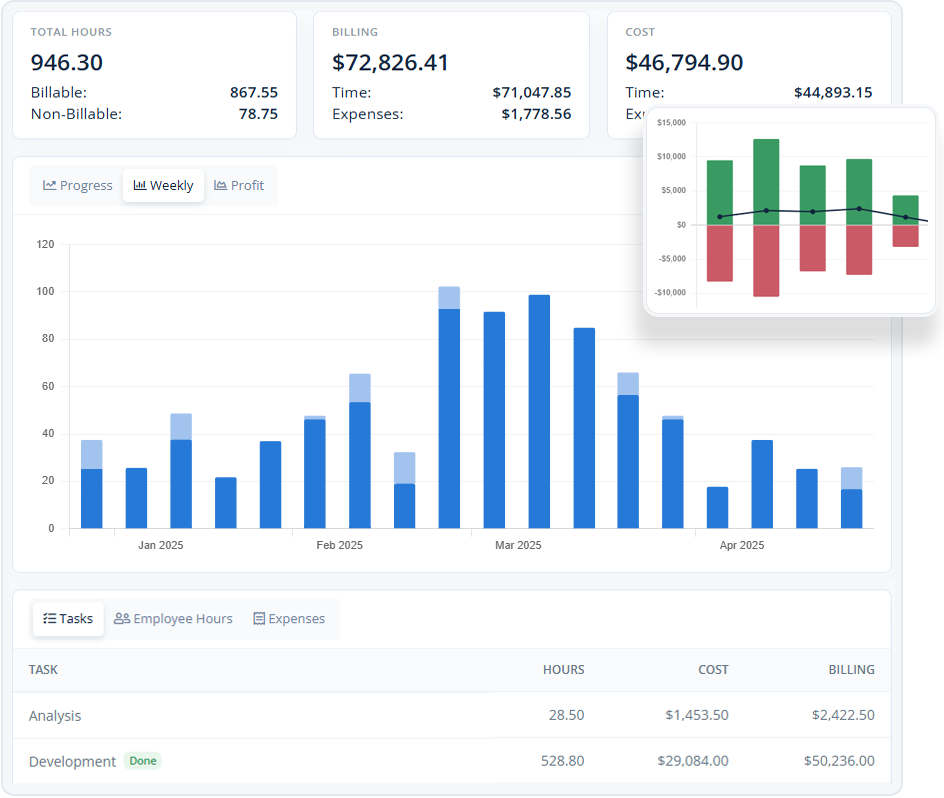
Software and IT projects often include a mix of planned work, support interruptions, maintenance, meetings, and follow-up. MindSalt helps managers compare actual time with budgets, billing, costs, and project expectations so project reviews are based on real details, not guesses.
- Track hours, billing, cost, and expenses together by project.
- Compare estimates or budgets with actual project and task time.
- Apply different rates by project, task, employee, or assignment so time records match the way the work is billed.
Learn more about project tracking and budgets.
Approvals and Reporting
Review technical hours before they reach payroll or clients
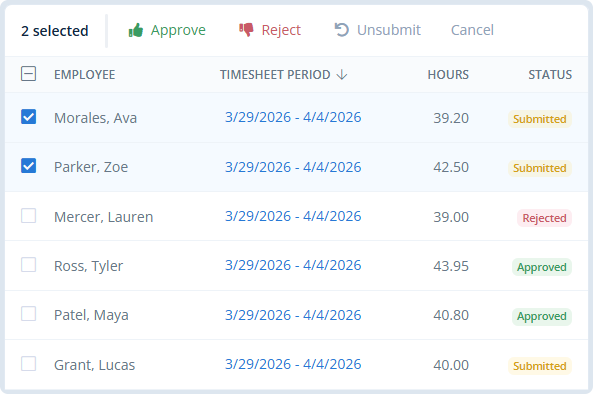
Managers can review submitted time before it moves into payroll, billing, client reports, or project analysis. Approvers can review submitted timesheets, catch missing notes, reject items that need changes, and keep a clearer record of what happened.
- Route time to employee managers, project managers, clients, or custom approvers.
- Review submitted time before it becomes billing-ready or payroll-ready.
- Use reporting to spot unsubmitted, pending, approved, or rejected time.
Learn more about timesheet approvals.
Built for Technical Workflows
A better way to manage software, IT, and support time
MindSalt works well for teams that need time tracking to do more than record hours for payroll. When time affects client billing, delivery budgets, support visibility, staffing, or profitability, the details matter.
Software development teams
Track hours by project, task, feature, bug, sprint, or client deliverable so estimates and delivery reports have better historical context.
IT service and support teams
Connect help desk work, maintenance, internal requests, system projects, and client support to the right departments, clients, and projects.
SaaS and implementation teams
Keep implementation, onboarding, customization, training, support, and product work easier to separate for billing, budgets, and planning.
More Software and IT Time Tracking Features
Tools for project time tracking, support work, budgets, and reporting
Timer and manual entry
Start a timer while work is happening or enter hours manually when it is easier to catch up later.
Project and task tracking
Track time by project, task, activity, ticket, or client.
Billable and internal work
Separate client delivery from support, admin, and internal work.
Approval workflows
Review submitted time before payroll, billing, or reporting.
Project budget tracking
Compare planned budgets with actual hours, costs, and expenses.
Support work visibility
See where help desk, maintenance, and client support time goes.
Mobile access
Let employees enter time from the office, at home, or on site.
Exports and reports
Export time and expense reports for billing, finance review, operations, or project analysis.
Technical Time Tracking Challenges
Common Software and IT time tracking challenges MindSalt helps solve
Software and IT teams need more than a simple timer. They need a practical way to capture technical effort, separate client and internal work, review hours, and turn that data into useful project and business insight.
| Common challenges | How MindSalt helps |
|---|---|
| Ticket and task work gets spread out Development, bugs, support requests, implementation tasks, and internal work can span several projects, clients, and priorities. |
Track time by project, ticket, and task Track hours by client, project, task, ticket, activity, employee, date, and work notes. |
| Context switching makes time harder to capture Technical teams move between code, meetings, incidents, support queues, reviews, planning, and quick fixes throughout the day. |
Quick time entry Use timers, manual entry, favorites, and copy options so time entry does not become another interruption. |
| Billable and internal work Client delivery, internal development, support, maintenance, admin, and training all use team capacity. |
Separate billable and internal work Keep client work separate from internal activity while still seeing the full picture of team effort. |
| Estimates can drift as work changes Features, bugs, infrastructure work, and support requests can take more time than expected. |
Reports that improve future estimates Review actual time by project, task, employee, and date so future estimates are based on what the work really took. |
| Support and maintenance can take over the week Recurring support, patches, updates, incidents, and internal requests can quietly consume more time than expected. |
See where support time is going Track support and maintenance by client, department, project, system, task, or activity. |
| Project budgets can slip before anyone notices Implementation, customization, migration, and product work can move past the original plan before the trend is easy to see. |
Budget tracking Compare planned budgets with actual time, expenses, and project costs. |
| Approval delays Time may need review by employee managers, project managers, finance, or client-facing leads. |
Approval workflows Route submitted time to the right reviewers with notifications and status tracking. |
| Client and leadership reporting Clients and leaders often need to see what was done, which projects used time, and what the work cost. |
Reports that answer project questions Report by client, project, task, employee, billable status, budget, cost, or date range. |
Related MindSalt Features
More ways to connect technical work, budgets, and reporting
Time Tracking
Track hours by client, project, task, activity, and billable status from a simple daily or weekly view.
Project Tracking
Compare project budgets, actual hours, costs, expenses, billing, and profitability in one connected view.
Reporting
Review software, IT, support, and implementation time by client, project, employee, task, budget, and date range.
Expense Tracking
Capture receipts and project costs for travel, purchases, cloud services, equipment, and other billable or reimbursable expenses.
Approvals
Route submitted time and expenses to managers, project leads, finance, or other reviewers before billing or payroll.
Notifications and Mobile
Use reminders and mobile time entry to help employees submit hours from a desktop, laptop, tablet, or phone.
FAQ
Common Software and IT Time Tracking Questions
Why should software and IT teams track time?
Time tracking helps technical teams understand where effort is going across development, support, maintenance, implementation, internal work, and client projects. MindSalt helps connect those hours to projects, tasks, budgets, approvals, billing, and reporting so managers can plan with better information.
Can MindSalt track time to tickets or tasks?
Yes. Employees can track time by client, project, task, activity, and comments. Teams that manage work in ticketing or project tools can use MindSalt task and activity details to keep time organized for bugs, features, support issues, implementation tasks, and internal work.
Can MindSalt separate billable and internal technical work?
Yes. Teams can separate client-facing work from internal development, support, admin, maintenance, training, research, and other non-billable activity. This helps with utilization reviews, client billing, project profitability, and planning future capacity.
How does MindSalt help with software project budgets?
MindSalt helps teams compare planned project budgets with actual hours, expenses, billing, and costs. That gives project managers a clearer view of delivery effort, budget pressure, and profitability before small overruns become bigger issues.
Can managers approve technical time before billing or payroll?
Yes. MindSalt can route submitted timesheets to the right reviewers before time is used for billing, payroll, reimbursement, or project reporting. Approval workflows help keep records cleaner and make it easier to see what is pending, approved, or rejected.
Get started with MindSalt
Ship code. Support users. Track the work clearly.
Try all features for 30 days, totally free.
No credit card. No setup fees. No nonsense.