
Freelance Time Tracking
Time Tracking Software for Freelancers
Track client work, billable hours, project expenses, and invoice-ready details in one place, so you can stay organized without managing spreadsheets of hours.
Built for Client Work
Your work deserves more than a stopwatch
Freelancers need more than a timer. You need a clean way to remember what you did, connect hours to the right client, track reimbursable costs, and prepare billing details without losing half a day to admin work.
Track the work behind each invoice
Capture the details behind each invoice: client, project, task, date, notes, and billable status.
Keep billing details connected
Separate billable and non-billable hours, add notes, and use reports to support cleaner client billing conversations.
Capture expenses before they disappear
Track reimbursable or billable expenses with receipts, notes, project details, and exportable records for your clients or accountant.
Time tracking that works around the way freelancers work
MindSalt helps freelancers organize client work, prepare better billing records, and understand which clients, projects, and services are worth the time. Use it for hourly billing, project work, retainers, expenses, reporting, and the small business details that surround the work itself.
Client Time Tracking
Know where every freelance hour goes
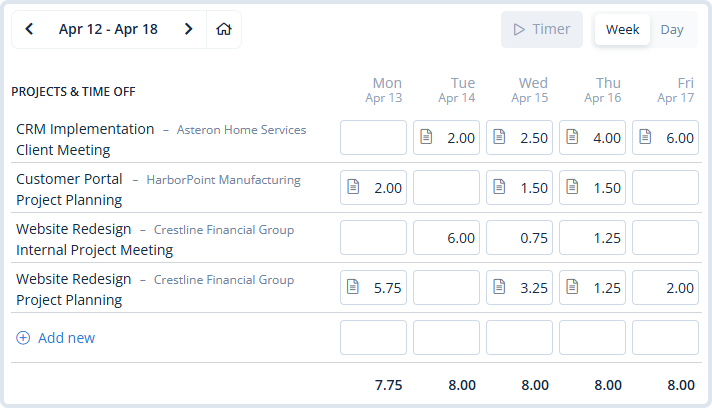
Freelancers move between client work, calls, revisions, admin tasks, and follow-up throughout the day. MindSalt helps you capture the details as you go, so you are not trying to piece together the week later.
- Track work by client, project, task, activity, and date.
- Use daily, weekly, bi-weekly, semi-monthly, or monthly timesheets.
- Keep billable, non-billable, admin, and internal time easier to separate.
Client Billing and Profitability
Turn tracked time into better business decisions
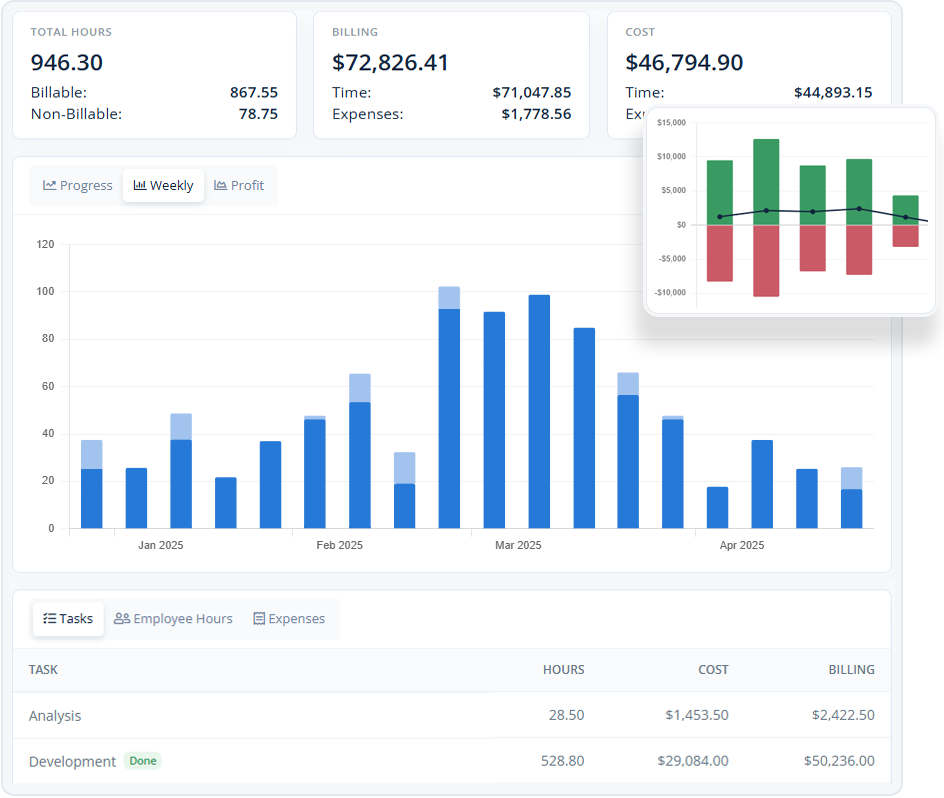
Time tracking is not only about sending an invoice. For freelancers, it can show which clients are profitable, which services are underpriced, and which projects are quietly turning into more work than expected.
- Review billable hours, costs, expenses, and budgets by project.
- Use different rates for different clients, projects, or tasks.
- Use reports to improve estimates, retainers, and future proposals.
Learn more about project tracking and budgets.
Freelance Expenses
Keep receipts and client expenses from getting lost
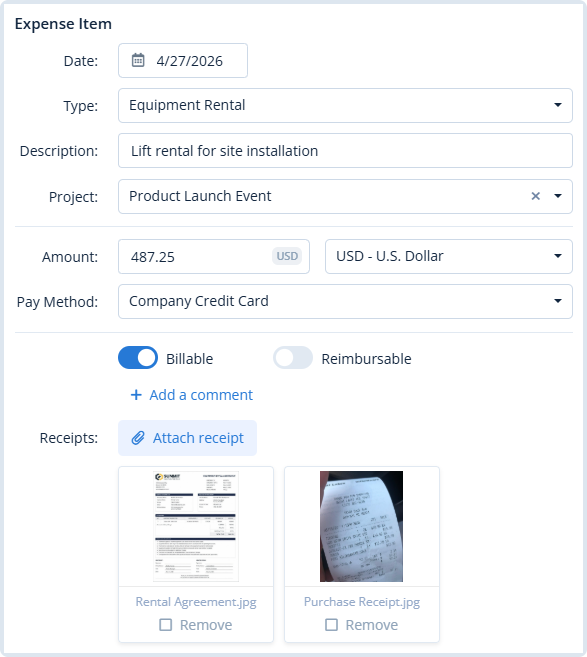
Freelance expenses are often small enough to forget but important enough to affect your margin. MindSalt helps you capture billable and reimbursable costs, attach receipts, and keep project costs connected to the client work they support.
- Track mileage, software, supplies, travel, materials, or other client costs.
- Attach receipts and notes before details are forgotten.
- Mark expenses as billable, reimbursable, or both.
Learn more about expense tracking.
Built for Freelance Workflows
A better way to manage billable freelance work
Whether you sell your time directly, work on fixed-fee projects, manage retainers, or occasionally bring in outside help, MindSalt helps keep the business side of freelance work easier to understand.
Designers, writers, and creatives
Track concept work, revisions, meetings, production time, and non-billable admin so client work stays easier to price and explain.
Developers and technical freelancers
Separate implementation, support, maintenance, troubleshooting, planning, and client communication so project records stay useful after the work is done.
Independent consultants
Keep advisory hours, research, calls, travel, deliverables, and reimbursable costs connected to the right client engagement.
More Freelance Time Tracking Features
Tools for tracking, billing, and understanding your freelance business
Client folders for every job
Keep each hour tied to the right client, job, project, or task.
Billable vs. non-billable time
Separate client work from proposals, admin tasks, follow-up, and other time you may not bill directly.
Different rates by client or project
Use different rates for different clients, services, projects, or activity.
Quick time entry
Add time as you work, at the end of the day, or when you are catching up before billing.
Support your invoices
Use time, notes, project details, rates, and expenses to support client billing conversations.
Bookkeeping exports
Export time and expense records when you need cleaner details for accounting, tax prep, or client backup.
Understand your most profitable work
Review hours, rates, expenses, costs, and project details to see which clients and projects are worth more of your time.
Client-ready records
Keep a clear trail of time, expenses, notes, receipts, and project details for clients, bookkeeping, or year-end review.
Freelance Billing Challenges
What freelancers look for in time tracking software
Freelancers need time tracking that supports billing, client communication, expenses, and business decisions, not just a timer that records hours without context.
| Common challenges | How MindSalt helps |
|---|---|
| Recreated time entries Client work is harder to bill accurately when hours are rebuilt from memory days later. |
Detailed time tracking Track time by client, project, task, date, activity, and notes. |
| Billable and admin work Client delivery, revisions, estimates, follow-up, bookkeeping, and unpaid admin can blend together. |
Billable status tracking Separate client work from internal time, admin tasks, project management, and write-offs. |
| Client-specific billing detail Different clients may expect different levels of detail on invoices and project summaries. |
Organized project records Keep work organized by client, project, task, rate, note, and date range. |
| Small client expenses Mileage, stock assets, supplies, travel, software, and client purchases are easy to forget. |
Expense and receipt tracking Attach receipts and connect billable or reimbursable costs to the right client and project. |
| Scope changes Extra revisions, added requests, and longer-than-expected work can change project profitability. |
Project reporting Review hours by client, project, task, and date to understand where time is going. |
| Invoice questions Clients may ask what changed, why work took longer, or what was included in a billable block. |
Cleaner billing backup Use time notes, project detail, expense records, and reports to support billing conversations. |
| Fixed-fee profitability Flat-rate projects can look profitable until the actual hours are reviewed. |
Better estimate history Compare project time against past work to improve future pricing and estimates. |
| Bookkeeping records Time, expenses, receipts, and client work are harder to review when they live in different places. |
Organized work history Keep clients, projects, time, expenses, receipts, and reports easier to review later. |
Related MindSalt Features
More ways to connect time, billing, budgets, and reporting
Time Tracking
Simple daily and weekly timesheets for tracking hours by project, task, and activity.
Project Tracking
Connect project hours, expenses, budgets, costs, billing, and profitability in one place.
Reporting
Review billable hours, non-billable work, project budgets, utilization, billing, and profitability.
Approvals
Review time and expenses before they are used for client billing, reimbursement, or your own records.
Expense Tracking
Capture billable expenses, reimbursable costs, mileage, receipts, and project-related spending.
Mobile Access
Track time and expenses from any device, including phones and tablets.
FAQ
Common freelance time tracking questions
What is time tracking software for freelancers?
Time tracking software for freelancers helps independent professionals record work by client, project, task, date, billing status, and notes. Instead of relying on memory or spreadsheets, you can keep time, expenses, reports, and billing details organized as work happens.
Can I track more than one client or project at a time?
Yes. MindSalt lets you organize time by client, project, task, activity, and date, so you can switch between freelance jobs without mixing the records together. That makes it easier to prepare client reports, answer invoice questions, and understand where your workweek actually went.
Can I separate billable and non-billable time?
Yes. MindSalt can help you keep client work separate from admin time, proposals, internal work, meetings, write-offs, and other non-billable activity so reports tell a clearer story.
Can freelancers track reimbursable expenses and receipts?
Yes. Expenses can be tied to projects, marked as billable or reimbursable, and saved with receipt attachments so client costs and supporting documents stay connected.
Can I use MindSalt to support client invoices?
MindSalt helps you prepare invoice-ready time and expense details by organizing hours, notes, rates, clients, projects, tasks, and exports. That gives you cleaner supporting records when it is time to bill a client.
Can MindSalt help if my freelance business grows?
Yes. You can start with simple solo time and expense tracking, then use more structured projects, rates, reports, and billing workflows as your freelance business becomes more complex.
Get started with MindSalt
Your time. Your business. Your rules.
Track freelance work, expenses, and billing details without turning invoice day into spreadsheet day.