Billable Hours Tracking
Billable Hours Tracking Software for Project Teams
Track billable and non-billable hours by client, project, task, and employee so your team can review time, protect budgets, create invoices, and understand profitability without digging through spreadsheets.
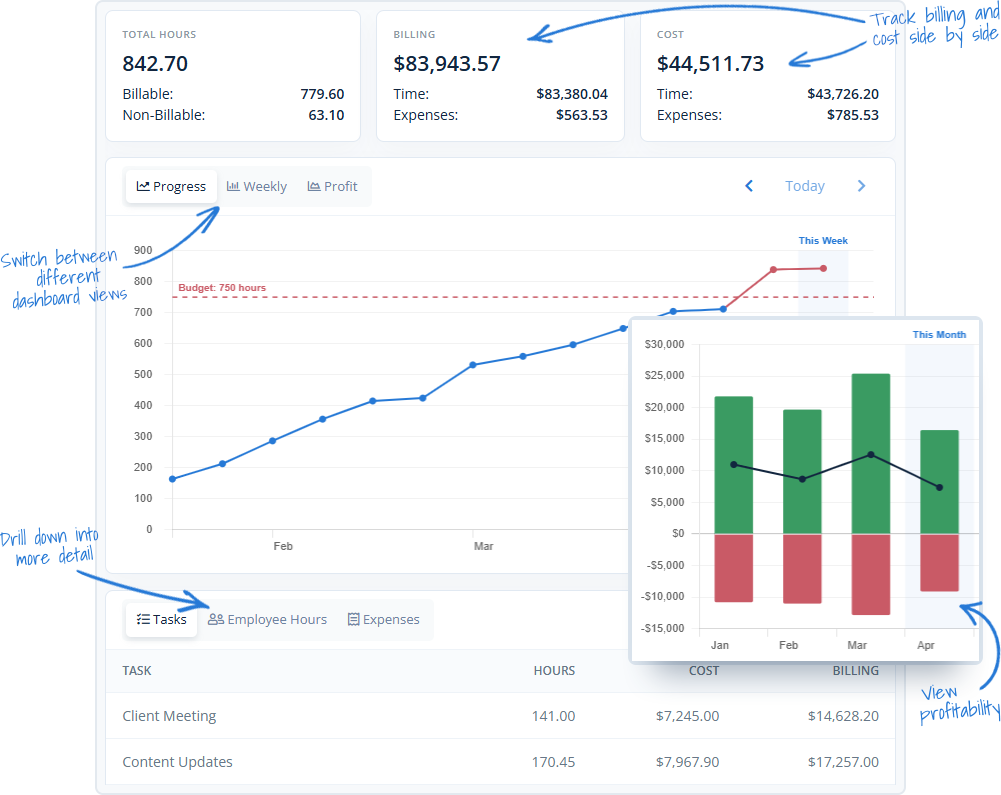
From Timesheet to Invoice
Keep billable work connected from the first time entry
Billable hours are only useful when the details stay connected. MindSalt helps teams track hours to the right client, project, task, rate, and approval path so managers and finance teams can turn everyday time entries into cleaner billing, better project visibility, and more useful reports.
Track the right work
Employees can enter time by client, project, task, activity, or time off category, helping each billable hour land where it belongs from the start.
Separate billable and non-billable hours
Keep client work, internal time, admin work, project management, meetings, and write-offs easy to review without losing the complete picture of where time went.
Review before billing
Use approvals, manager reviews, and reporting to catch missing details before time is used for payroll, client billing, invoice generation, or project analysis.
Billable hours software that connects the work to the business
MindSalt helps teams capture billable work clearly, review it before it reaches a client, and use the details for budgets, reporting, invoices, and profitability. Employees get a simple way to enter time. Managers get the context they need to understand where the hours are going.
Time Entry
Make billable time easy for employees to enter
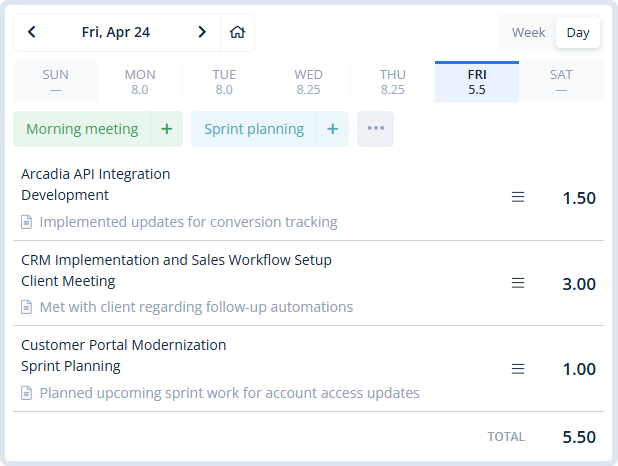
When tracking time feels like a chore, billable hours are easier to miss. MindSalt keeps the entry process simple while still capturing the details your business needs: employee, date, client, project, task, hours, comments, and billable status.
- Use daily, weekly, bi-weekly, semi-monthly, or monthly timesheets.
- Track project work, internal time, PTO, and other activities in one place.
- Let employees copy recent work, use favorite activities, and enter time from any device.
Project Visibility
Connect billable hours to projects, budgets, and profitability
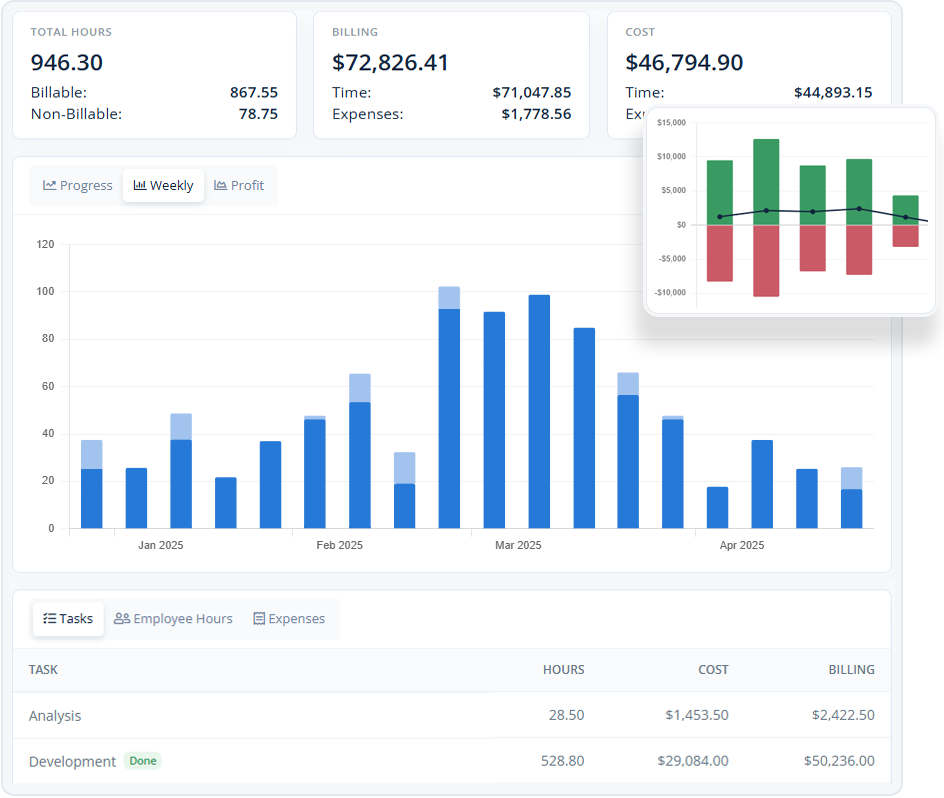
Time tracking should help you manage the work, not just bill for it. With MindSalt, tracked hours can support project budgets, billing reports, cost analysis, and profitability reviews so managers can see how work is performing while there is still time to adjust.
- Track hours, billing, cost, and expenses together by project.
- Compare budgeted work with actual billable and non-billable time.
- Use project, task, employee, or assignment-level rates to match real billing rules.
Learn more about project tracking and budgets.
Approvals and Billing Review
Review billable time before it reaches the client
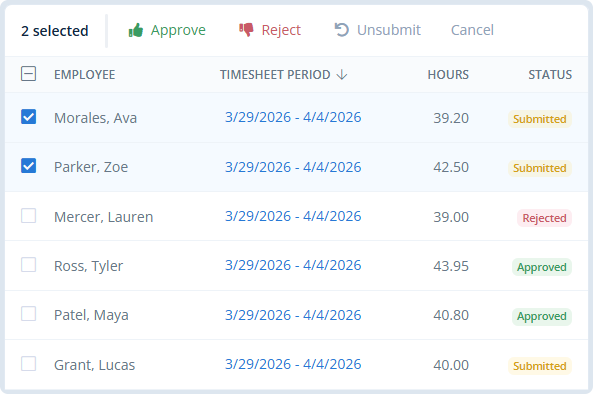
Approval workflows give managers a cleaner checkpoint before hours are used for payroll, billing, or invoice generation. Approvers can review submitted timesheets, catch missing notes, reject items that need changes, and keep an audit trail of what happened.
- Route timesheets to direct managers, project managers, clients, or custom approvers.
- Review submitted hours before they become invoice-ready.
- Use reporting to spot unsubmitted, pending, approved, or rejected time.
Learn more about timesheet approvals.
Built for Project-Based Billing
A better way to manage billable hours across teams
MindSalt works especially well for teams that need time tracking to support more than payroll. When time affects client billing, project budgets, contract limits, team utilization, or profitability, the details matter.
Consultants and professional services
Track hours by client, project, task, and consultant so billing details are easier to review before invoices go out.
Software and IT teams
Connect development, support, implementation, maintenance, and internal work to the right projects for cleaner budget and utilization reporting.
Agencies and client service teams
Keep billable work visible as people shift between clients, campaigns, retainers, and internal tasks throughout the day.
More Billable Hours Features
Useful tools for tracking, reviewing, and reporting billable work
Billable & non-billable time
Separate client work from internal hours, admin time, and write-offs.
Flexible billing rates
Use different rates by employee, project, task, or assignment.
Project and task budgets
Compare tracked hours, billing, costs, and budgets in one place.
Approval workflows
Review submitted time before payroll, billing, or invoice creation.
Invoice-ready reporting
Use approved time and billing details to create cleaner invoices.
Billable expenses
Connect reimbursable and billable expenses to the same project work.
Mobile access
Let employees enter time from the office, at home, or on the road.
Exports
Download data for finance, payroll, operations, or deeper analysis.
Billing Challenges
What teams look for when tracking billable hours
Most teams are not just looking for a timer. They need a cleaner way to capture billable work, review it, connect it to projects, and turn it into useful billing and profitability data.
| What teams struggle with | How MindSalt helps |
|---|---|
| Billable time gets missed When time is entered late or scattered across spreadsheets, teams lose revenue and spend too much time cleaning up missing details. |
Make time entry easier to keep up with Employees can track time in simple daily or weekly views, copy recent activities, use reminders, and enter hours from mobile devices so billable work is captured closer to when it happens. |
| Hours are not tied to the right work Generic time totals are not enough when clients ask what was done, which project it belongs to, or why a billing amount changed. |
Connect hours to clients, projects, and tasks Track hours by client, project, task, employee, and activity so time is organized for project tracking, client billing, reporting, and review. |
| Managers review time too late Unreviewed time can create billing mistakes, payroll issues, and awkward client conversations after invoices are already prepared. |
Review time before it reaches billing Approval workflows help managers review submitted hours before they are used for invoices, payroll exports, and project reports. |
| Rates and billing rules are messy Some teams bill by employee, some by project, some by task, and some need different rules for specific clients or work types. |
Support flexible billing details MindSalt supports flexible billing rates and reporting by employee, client, project, and task, helping teams turn approved time into cleaner billing and invoice data. |
| Profitability is hard to see until it is too late Billable hours, non-billable work, expenses, costs, and budgets often live in different places, making margin problems harder to spot. |
Bring project performance into view Connect time with project budgets, expenses, costs, and reports so teams can review billable work and profitability together. |
| Finance needs more than a time total Billing, payroll, client reports, and leadership reviews all need clean data that can be trusted after timesheets are submitted. |
Turn approved time into useful business data Use approved time for reporting, exports, client-facing summaries, payroll support, and invoice generation without rebuilding the story from disconnected tools. |
Related MindSalt Features
More ways to connect time, billing, budgets, and reporting
Time Tracking
Simple daily and weekly timesheets for tracking hours by project, task, and activity.
Project Tracking
Connect project hours, expenses, budgets, costs, billing, and profitability in one place.
Reporting
Review billable hours, non-billable work, project budgets, utilization, billing, and profitability.
Approvals
Review timesheets and expenses before they move into payroll, billing, or reimbursement workflows.
Expense Tracking
Capture billable expenses, reimbursable costs, mileage, receipts, and project-related spending.
Mobile Access
Let employees track time and expenses from any device, including phones and tablets.
FAQ
Common Billable Hours Tracking Questions
What is billable hours tracking software?
Billable hours tracking software helps teams record client work, separate it from internal or non-billable time, and organize those hours by client, project, task, employee, rate, and date. MindSalt connects billable time to approvals, budgets, reporting, and invoice creation so billing details are easier to trust.
Can MindSalt track billable and non-billable hours?
Yes. MindSalt can track billable and non-billable hours so teams can understand client work, internal work, utilization, project profitability, and billing readiness without maintaining separate spreadsheets.
Can different projects, employees, or tasks use different billing rates?
Yes. MindSalt supports flexible rate structures, including rates by employee, project, task, or assignment. This helps teams handle client-specific contracts, special project pricing, task-based rates, and other real-world billing rules.
Can billable hours be approved before invoicing?
Yes. Timesheet approval workflows let managers, project managers, clients, or other approvers review submitted hours before they move into billing, payroll, invoice generation, or reporting.
Does billable hours tracking help with project budgets?
Yes. Billable hours can be compared against project or task budgets so managers can see whether work is staying on track. MindSalt can also bring expenses, costs, billing, and profitability into the same project view.
Can MindSalt create invoices from tracked time?
Yes. MindSalt can create invoices using tracked time and related billing details, which helps reduce the cleanup that often happens between timesheet review and client billing.
Can reports show billable hours by client, project, employee, or date range?
Yes. MindSalt reporting can help teams review billable hours, non-billable hours, project time, employee activity, budgets, billing, and profitability across useful filters and date ranges.
Get started with MindSalt
Track billable hours without the billing cleanup.
Try all features for 30 days, totally free.
No credit card. No setup fees. No nonsense.