
Approvals
Timesheet and Expense Approvals
Timesheet and expense approval software that helps teams review, approve, or reject submissions faster with flexible workflows for payroll, billing, invoicing, and reimbursements.
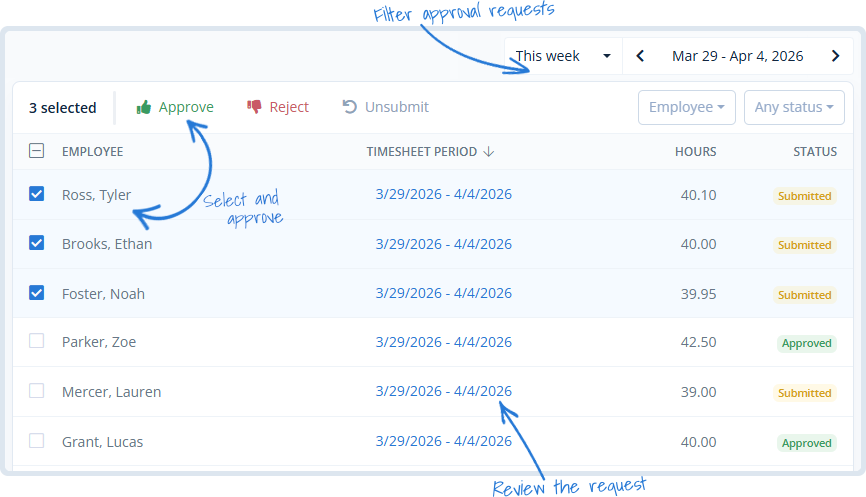
Approval workflows that fit the way your team works
MindSalt keeps timesheet and expense approvals clear without making the process feel heavy. Teams can route submissions to the right managers, separate time and expense reviews, track what is still pending, and keep approved data ready for payroll, billing, invoicing, and reimbursement.
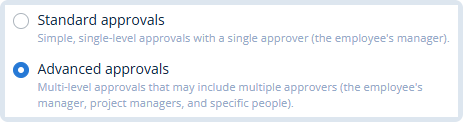
Approval Options
Choose standard approvals for simple manager review, or use advanced workflows when submissions need to move through project managers, employee managers, finance, accounting, or other designated approvers. Your team gets the approval path it needs without adding extra steps where they do not belong.
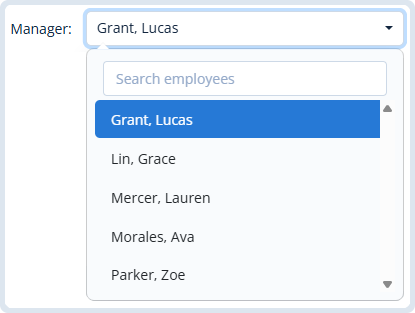
Manager Review
Assign the manager responsible for reviewing each employee’s submitted timesheet or expense report. It keeps approval ownership clear, so employees know where submissions go and managers know what needs their attention.
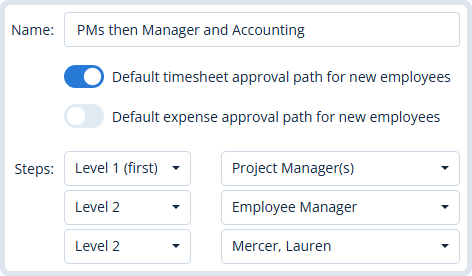
Advanced Workflows
Build multi-level approval workflows for teams that need more than one review step. Timesheets and expenses can move through project managers, employee managers, finance, accounting, or other approvers before they are ready for payroll, billing, or reimbursement.
Separate Paths
Set separate approval paths for timesheets and expenses on a per-employee basis. This is helpful when expense submissions need finance or accounting review before reimbursement, while timesheets follow a different approval flow.
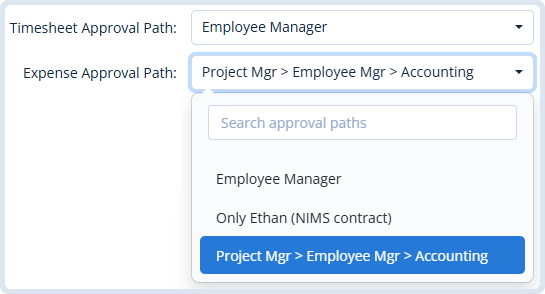

Submission Locking
Choose whether to lock only submitted hours or the full timesheet period after submission. This helps protect reviewed time while still giving your team flexibility for corrections, late entries, and real-world payroll or billing workflows.
Pending Approvals
Managers can focus on the timesheets and expenses waiting for their approval instead of sorting through everything. Once items are reviewed, they move out of the pending list so approval queues stay clean and easy to manage.
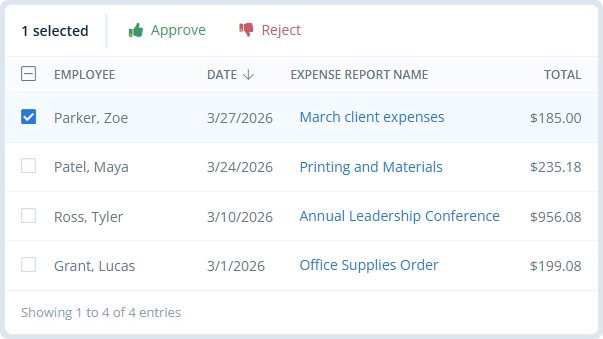
Approval Management
Approvals That Fit Your Team
Timesheet approvals and expense approvals should match how your organization actually works. MindSalt helps teams keep reviews clear, timely, and easy to manage without adding unnecessary steps.
Less back-and-forth
Give approvers the context they need so fewer submissions bounce between employees, managers, and finance.
Faster review cycles
Move submitted time and expenses through the right review path before payroll, billing, or reimbursements fall behind.
Clear approval ownership
Make it clear who is responsible for each approval, reducing confusion across managers, projects, and departments.
Finance-ready data
Keep approved time and expenses organized so finance has cleaner data for payroll, invoicing, and reimbursement.
More Approval Features
More Ways to Keep Approvals Moving
Approval alerts
Notify reviewers when approvals need attention.
Status reports
See what’s submitted, pending, or overdue.
Submission tracking
Monitor who has and hasn’t submitted their timesheet or expense report.
Approval history
Track every submittal, approval, and rejection.
Reviewer visibility
Know which manager still needs to act.
Audit ready
Keep approval records clear and accountable.
Related Features
Time Tracking
Expense Tracking
Projects
Compliance
FAQ
Common Approval Questions
What is timesheet and expense approval software?
Timesheet and expense approval software helps teams review submitted time and expenses, route approvals to the right managers, track pending items, keep approval history, and prepare approved data for payroll, billing, invoicing, and reimbursement.
Can I assign different timesheet and expense approval paths for different employees?
Yes. With MindSalt you can assign different timesheet and expense approval paths for each employee. This is helpful when full-time employees, contractors, project teams, or expense reimbursements need different review steps.
Can approvals include project managers, employee managers, or finance?
Yes. Advanced approvals can include project managers, employee managers, finance, accounting, or other designated approvers in your organization.
Can MindSalt support different approval workflows for time and expenses?
Yes. MindSalt can use different approval paths for timesheets and expenses, so time can follow one review process while expenses can go through finance, accounting, project managers, or other approvers before reimbursement.
Can managers see only the items they need to approve?
Yes. Managers can view pending timesheets and expenses that require their approval, helping them focus on the submissions that need action.
Can submitted timesheets be locked after approval?
Yes. MindSalt can lock submitted or approved time based on your settings, helping protect reviewed records from unwanted changes.
Can approval workflows help with payroll and billing reviews?
Yes. Approved time and expenses give payroll, billing, and finance teams cleaner data to review before processing payments, invoices, or reimbursements.
Get started with MindSalt
Simple Approvals Without the Back-and-Forth
Try all features for 30 days, totally free.
No credit card. No setup fees. No nonsense.