
Time Off & Accruals
Make Time Off Easy to Track and Manage
Time off tracking software that helps teams manage PTO accruals, employee balances, vacation, sick time, and time off rules without digging through spreadsheets.
Time off tracking that keeps balances easy to understand
MindSalt keeps PTO accruals, vacation, sick time, balance limits, and employee visibility in one place. Teams can manage time off rules, prevent accidental overuse, and give employees a simple way to see what they have available before entering time off.
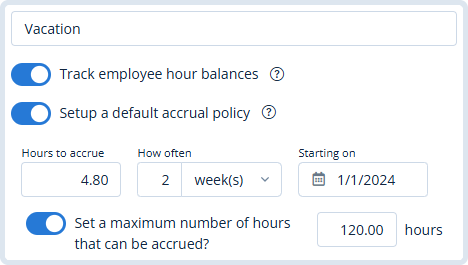
Accrual Rules
Set up time off categories with tracked balances and default accrual policies. Policies can also be adjusted by employee type or individual employee, so different groups can earn time off at different rates.
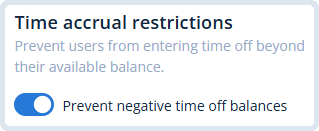
Balance Limits
Help prevent accidental overuse by blocking employees from submitting more time off than they have available. It keeps PTO requests aligned with company policy and saves managers from cleaning up avoidable balance surprises.
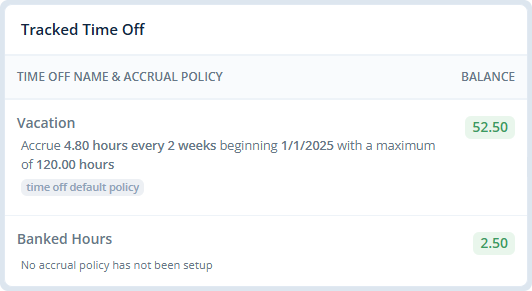
Employee Balances
Admins can quickly review each employee’s time off balances and see which accrual policy is being applied. This makes it easier to confirm vacation, sick time, and other balances at a glance.
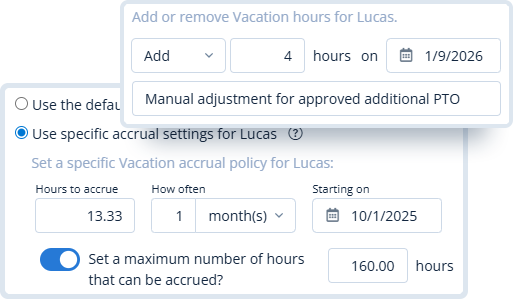
Manual Adjustments
Override accrual policies for individual employees when special rules apply. Admins can also add or deduct hours for corrections, carryovers, negotiated benefits, and approved exceptions.
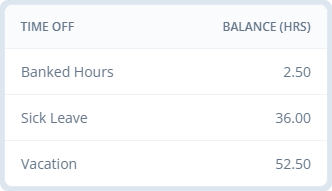
Hour Balance Visibility
Employees can view their available time off directly from their timesheet. This gives them a quick way to check vacation, sick time, or other balances before entering time off.
Related Features
Time Tracking
Approvals
Reporting
Compliance
FAQ
Common Time Off Questions
What is time off tracking software?
Time off tracking software helps teams manage PTO, vacation, sick time, accrual rules, employee balances, and time off requests in one place. MindSalt helps employees see available balances and helps admins keep policies, adjustments, and limits easier to manage.
How does automatic PTO accrual tracking work?
PTO accrual tracking automatically adds time off to an employee’s balance based on the policy you configure. For example, full-time employees may earn vacation hours each pay period, while another employee type may follow a different accrual schedule.
Can different employees have different time off policies?
Yes. MindSalt can use a company default policy, an employee type policy, or an individual employee override. This is helpful when senior employees, new hires, part-time employees, or negotiated benefits need different accrual rules.
Can employees use more PTO than they have available?
Admins can choose whether to allow or prevent negative time off balances. When negative balances are blocked, employees cannot submit more hours than they currently have available for that time off type.
Can admins adjust an employee’s PTO balance?
Yes. Admins can add or deduct hours when corrections, carryovers, negotiated benefits, or manual adjustments are needed.
Where can employees see their available time off?
Employees can view their available balances directly from their timesheet, making it easy to check vacation, sick time, or other tracked time off before entering hours.
Get started with MindSalt
Make Time Off Easier to Manage
Try all features for 30 days, totally free.
No credit card. No setup fees. No nonsense.