
Expense Tracking
Track Expenses Without the Paper Trail
Simple expense tracking software for teams that need to snap receipts, tag expenses, and keep project budgets on track in one simple place.
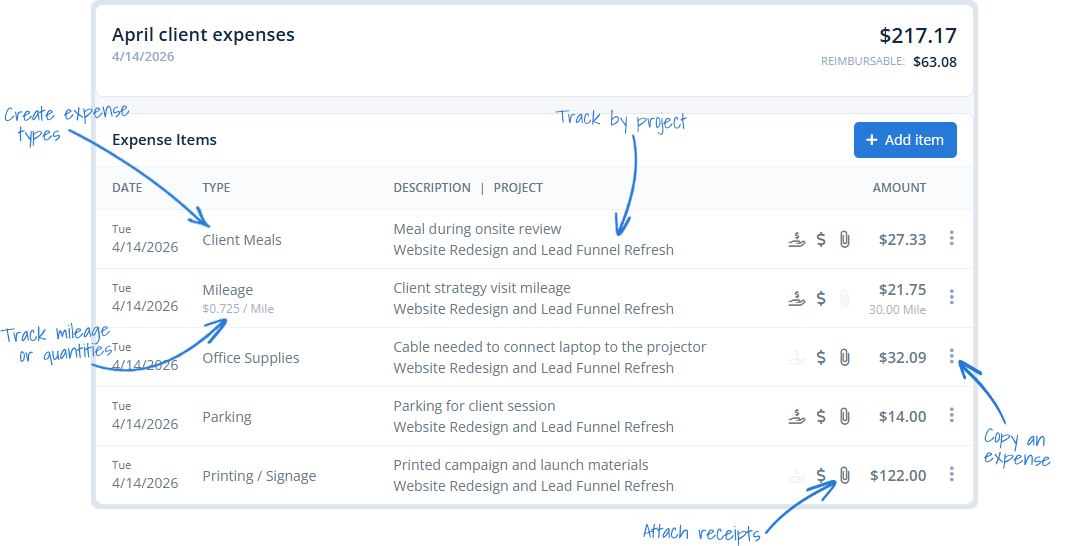
Expense tracking software that keeps costs connected
MindSalt keeps expenses close to the work they belong to. Teams can capture receipts, track billable or reimbursable costs, connect expenses to projects, and keep approvals, budgets, billing, and reimbursement moving without chasing paper or digging through email.
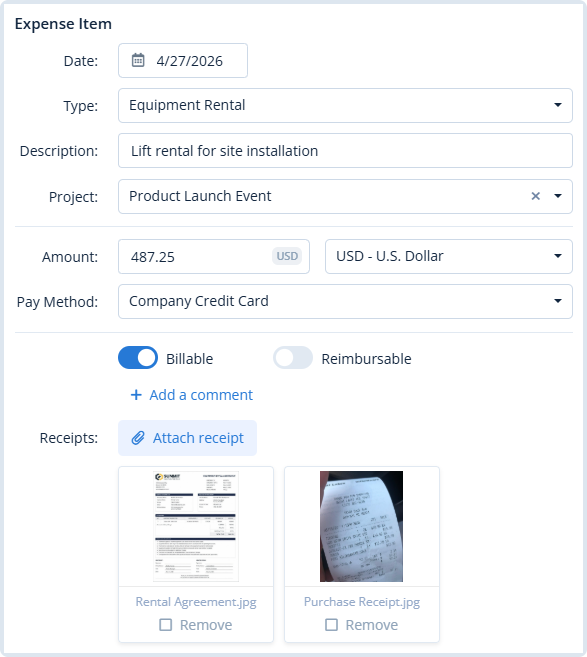
Expense Tracking with the Right Details
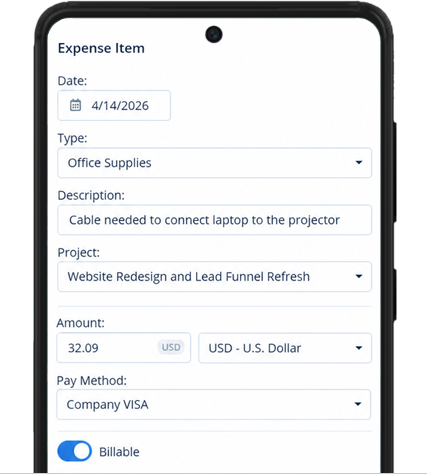
Track the details that matter for each expense, including project, client, category, date, notes, receipts, and whether the cost should be billed, reimbursed, or both. Everything stays connected to the work it supports, so expenses are easier to review later.
- Connect each expense to a project
Keep costs organized and tied to the work they support. - Mark what matters for billing or reimbursement
Flag expenses as billable, reimbursable, or both. - Attach receipts before they get lost
Upload supporting documents right with the expense entry.
Custom Expense Types That Fit Your Team
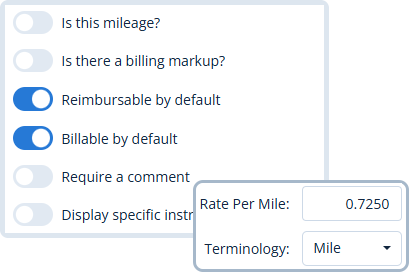
Every team spends a little differently. Set up expense types for mileage, meals, travel, supplies, per diem, quantities, units, days, or other details your team needs to track. Finance gets cleaner categories, and employees get expense forms that make sense for the way they work.
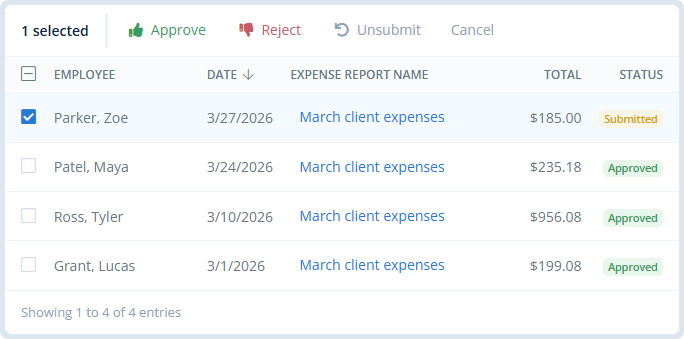
Review, Approve, Reimburse
Approvers can spot expenses waiting for review, check receipts and details, and approve or reject one or many items without slowing everyone down. Reimbursements keep moving, and finance has a cleaner trail to follow.
Capture Expenses on the Go
Add expenses from your phone, snap a receipt with the camera, or upload a file so everything is saved while the details are still fresh. It keeps receipt tracking simple, whether someone is at their desk, on the road, or between meetings.
Team Expense Reports
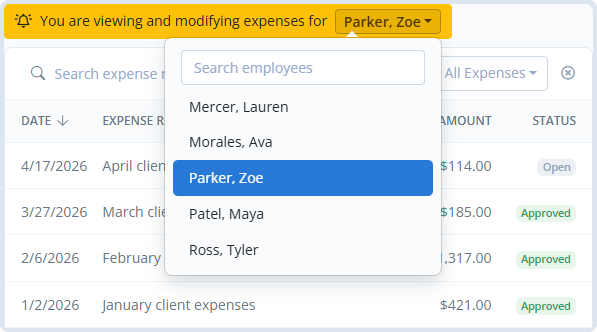
Managers and admins can review employee expenses, make updates when needed, and keep project costs current. It helps teams catch missing details, clean up reimbursements, and see where money is going before reports turn into detective work.
Built for Better Expense Tracking
Why teams choose MindSalt for expense tracking
Expense tracking should be simple, not scattered. MindSalt helps teams capture receipts, submit expenses, and keep project costs organized without chasing spreadsheets or sorting through email threads.
Project costs remain clear
Track expenses alongside time so teams can see the full cost of every project, not just the hours.
Receipts captured on the go
Employees can add expenses from any device and snap a picture of a receipt while it’s still in hand.
Faster reviews and approvals
Managers can review submitted expenses, approve what’s ready, and keep reimbursements moving.
Better billing accuracy
Billable expenses can be tracked to the right client and project so nothing gets missed when it’s time to invoice.
Cleaner records for finance
Organized expense details, receipts, and approval history make reporting, audits, and month-end cleanup easier.
Easy for everyone to use
Simple expense entry helps employees submit costs quickly without extra training or back-and-forth.
More Expense Tracking Features
A few more features to help teams track expenses
Track mileage
Log trips and calculate reimbursable mileage.
Recurring budgets
Set budgets that repeat on a regular schedule.
Custom expense types
Match categories to how your team spends.
Receipt download
Export receipts when finance needs them.
Track quantities
Track units, days, miles, or custom counts.
Categorize by project
Tie every expense to the right work.
Billable expenses
Mark expenses for client billing.
Export
Download your data in Excel, CSV, or PDF.
Related Features
Projects
Approvals
Reporting
FAQ
Common Expense Questions
What is expense tracking software?
Expense tracking software helps teams capture receipts, submit expenses, connect costs to projects, review approvals, and organize expense data for reimbursement, billing, reporting, and finance. MindSalt keeps the process simple so expenses do not get lost in spreadsheets, email, or paper receipts.
Can employees attach receipts to expenses?
Yes. Employees can upload receipt files or capture receipts from their phone so supporting documents stay with the expense.
Can expenses be tracked by project?
Yes. Expenses can be tied to the right project, helping teams see project costs beyond employee hours and keep budgets easier to follow.
Can MindSalt track billable and reimbursable expenses?
Yes. Expenses can be marked as billable, reimbursable, or both, making it easier to support client billing and employee reimbursement.
Does MindSalt support custom expense types?
Yes. You can create expense types that match how your team spends, including mileage, per diem, quantities, units, days, and other custom categories.
Can expense data and receipts be exported?
Yes. MindSalt can export expense data for reporting, finance reviews, reimbursement workflows, or further analysis. Receipts can also be downloaded later when finance, accounting, or project teams need supporting documentation.
Get started with MindSalt
Track expenses without the paper chase.
Try all features for 30 days, totally free.
No credit card. No setup fees. No nonsense.